2026年3月27日
知识点回顾
00.sed后向引用
echo mysql linux|sed -r 's#(.*) (.*)#\2 \1#g'
1.awk 取行
awk 'NR==1' 1.txt
2.awk 取列
awk '{print $1}' 1.txt
3.awk模糊过滤
awk '/root/' 1.txt
4.awk 数字比对
awk '$3==90' count.txt
awk '$3>90' count.txt
awk '$3>100&&$3<110' count.txt
awk '$3>60||$3<80' count.txt
5.模式+动作
awk '$3>80{print $1,$3}' count.txt
awk 'NR>3{print $(NF-1)}' 1.txt
awk -F: 'NR>3{print $(NF-2)}' 1.txt
awk -F ": " 'NR>3{print ${}}'
01.用户管理
1.用户分类
面试题:开机自动执行命令的文件
/etc/rc.local   #只会在开机后执行1次
/etc/profile    #每次远程连接都会执行一次里面的命令
---systemctl enable 服务
系统默认用户分类:
角色              UID     作用权限
管理员:    root    0       最高权限、类似皇帝
傀儡(虚拟)用户:    1-999  禁止登录系统、系统运行程序使用虚拟用户
普通用户:          1000+  登录系统、管理自己的文件

#注意后面学习了可以指定用户的UID,比如创建普通该用户UID就可以指定为666
2.相关配置文件
/etc/passwd #存放用户名和密码的文件、每次登录系统都要验证这个文件 每列的含义
[root@oldboy ~]# head -2 /etc/passwd
root:x:0:0:root:/root:/bin/bash
bin:x:1:1:bin:/bin:/sbin/nologin
--------------------------
第一列:用户名称
第二列:x   用户名的密码
第三列:0   uid 用户的身份证号 唯一的
第四列:0   gid 小组的号码 唯一的
第五列:root 描述说明 可有可无 类似注释
第六列:/root 用户的家目录
第七列:用户解释器 解释权决定了我们是否可以登录系统,/bin/bash 普通用户可以登录系统,/sbin/nologin 傀儡用户,不允许登录系统。
#注意Linux系统创建了一个用户oldboy,默认会自动创建一个以oldboy命名的小组。
-----------------
/etc/shadow #密码文件不能删除
[root@oldboy ~]# cat /etc/shadow
root:$6$QmD2YHWAvJM1D6I4$x.slXxYQUMvK.renZy8/4B5WF3Znmk1qNiPHafCAYmoPa6NJf2BNrJYaGG1cxnturyEBA.a2cpUJRxn.Tem6j/::0:99999:7:::
3.创建用户
centos和kylin语法结构: useradd [参数选项] 用户名
参数选项:
        -u  #指定UID号
        -s  #指定解释器/bin/bash /sbin/nologin
        -M  #不创建家目录 ubt -m 创建家目录
        -g  #指定gid号
案例1:创建普通用户teest01
#使用useradd直接加用户名 系统会默认分配uid gid、和/bin/bash,可以登录普通用户(centos/kylin)
useradd test01
查看用户相关信息id命令
语法结构 :  id 用户名称
[root@oldboy ~]# id test01
uid=1000(test01) gid=1000(test01) groups=1000(test01)
----------------------------------
[root@oldboy ~]# tail -1 /etc/passwd
test01:x:1000:1000::/home/test01:/bin/bash
[root@oldboy ~]# grep 'test01' /etc/passwd
test01:x:1000:1000::/home/test01:/bin/bash
案例2:指定uid和gid为666的普通用户test02(面试题笔试题)
#注意、如果手动指定gid、必须要提前创建这个小组
[root@oldboy ~]# useradd -u666 -g666 test02
useradd: group '666' does not exist #这个小组不存在
第一步:选创建小组
[root@oldboy ~]# groupadd -g666 test02

第二步:在指定gid创建用户
[root@oldboy ~]# useradd -u666 -g666 test02
[root@oldboy ~]# grep 'test02' /etc/passwd
test02:x:666:666::/home/test02:/bin/bash
案例3:创建一个虚拟用户uid 777 gid 777,名称test03
第一步:创建小组
[root@oldboy ~]# groupadd -g777 test03
第二步:创建虚拟用户test03
[root@oldboy ~]# useradd -u777 -g777 -M -s /sbin/nologin test03
[root@oldboy ~]# id test03
uid=777(test03) gid=777(test03) groups=777(test03)
[root@oldboy ~]# grep 'test03' /etc/passwd
test03:x:777:777::/home/test03:/sbin/nologin
案例4:ubt创建指定uid和gid 666的 test01 普通账号
kylin和centos创建用户方式是相同的,但和ubt有一点区别
#ubt需要切换到管理员
oldboy@oldboy:~$ sudo su -
[sudo] password for oldboy:  密码1
创建普通用户
kylin:useradd test01
vs
ubt:useradd -m -s /bin/bash test01
----
创建虚拟用户:
kylin:useradd -M -s /sbin/nologin test02
vs
ubt:useradd test02
-----------------------------
kylin系统:
[root@oldboy ~]# groupadd -g666 test01
[root@oldboy ~]# useradd -u666 -g666 test01
[root@oldboy ~]# grep 'test01' /etc/passwd
test01:x:666:666::/home/test01:/bin/bash
ubt系统:
[root@oldboy ~]# groupadd -g666 test01
[root@oldboy ~]# useradd -u666 -g666 -m -s /bin/bash test01
[root@oldboy ~]# grep 'test01' /etc/passwd
test01:x:666:666::/home/test01:/bin/bash
案例5:ubt创建uid和gid 777的test02虚拟账号
kylin系统:
[root@oldboy ~]# groupadd -g777 test02
[root@oldboy ~]# useradd -u777 -g777 -M -s /sbin/nologin test02
[root@oldboy ~]# grep 'test02' /etc/passwd
test02:x:777:777::/home/test02:/sbin/nologin
ubt系统:
[root@oldboy ~]# groupadd -g777 test02
[root@oldboy ~]# useradd -u777 -g777 test02
[root@oldboy ~]# grep 'test02' '/etc/passwd'
test02:x:777:777::/home/test02:/bin/sh
4.修改用户
了解  usermod [参数选项] 用户
[root@oldboy ~]# usermod -c hehe test02
[root@oldboy ~]# grep 'test02' /etc/passwd
test02:x:777:777:hehe:/home/test02:/bin/sh
usermod -s /bin/bash test03
5.删除用户
语法结构:userdel -r 用户名
-r #连窝端 删除用户的家目录、其他相关
案例1:删除test03虚拟用户
[root@oldboy ~]# userdel -r test03
案例2:删除test02普通用户
[root@oldboy ~]# userdel -r test02
6.设置密码
语法结构:
        交互式修改密码 kylIn centos ubt相同
        passwd 用户名 #指定修改用户密码
        passwd #直接回车、修改当前登录用户的密码

        非交互式修改密码
        echo 密码|passwd --stdin 用户名 #centos keylin
        echo 用户:密码|chpasswd #ubuntu
案例1:kylIn修改test01的密码为old123.com
[root@oldboy ~]# passwd test01
Changing password for user test01.
New password:
Retype new password:
passwd: all authentication tokens updated successfully.
案例2:ubt修改密码为2
[root@oldboy ~]# passwd test01
New password:
Retype new password:
passwd: password updated successfully
案例3:修改root密码
[root@oldboy ~]# passwd
Changing password for user root.
New password:
Retype new password:
passwd: all authentication tokens updated successfully.
案例4:kylin修改test01密码h.123.com
[root@oldboy ~]# echo h.123.com|passwd --stdin test01
Changing password for user test01.
passwd: all authentication tokens updated successfully.
案例5:ubt修改test01密码为1
[root@oldboy ~]# echo test01:1|chpasswd
7.密码管理
1.密码要求复杂度
禁止设置弱口令 admin admin123 test test123 姓名+年月日
I-a]m?l_i=z8.3he.[nya@.I%a^m18

2.命令生成密码
[root@oldboy ~]# openssl rand -base64 12
LS55pt37o52vbScx

需要安装软件
yum -y install expect
[root@oldboy ~]# mkpasswd
5zAak4^Zg

3.软件工具生成密码
#管理密码的工具keepass
https://keepass.info/download.html
8.MD5
作用:可以对文件的内容生成一个唯一的MD5值
第一步:给1.txt做一个md5值
[root@oldboy ~]# md5sum 1.txt
60b725f10c9c85c70d97880dfe8191b3  1.txt

第二步:修改文件内容重新做MD5值发生变化
[root@oldboy ~]# echo heha >1.txt
[root@oldboy ~]# cat 1.txt
heha
[root@oldboy ~]# md5sum 1.txt
9ae8cb17ba22ef7fabc3ab5db6b717ae  1.txt
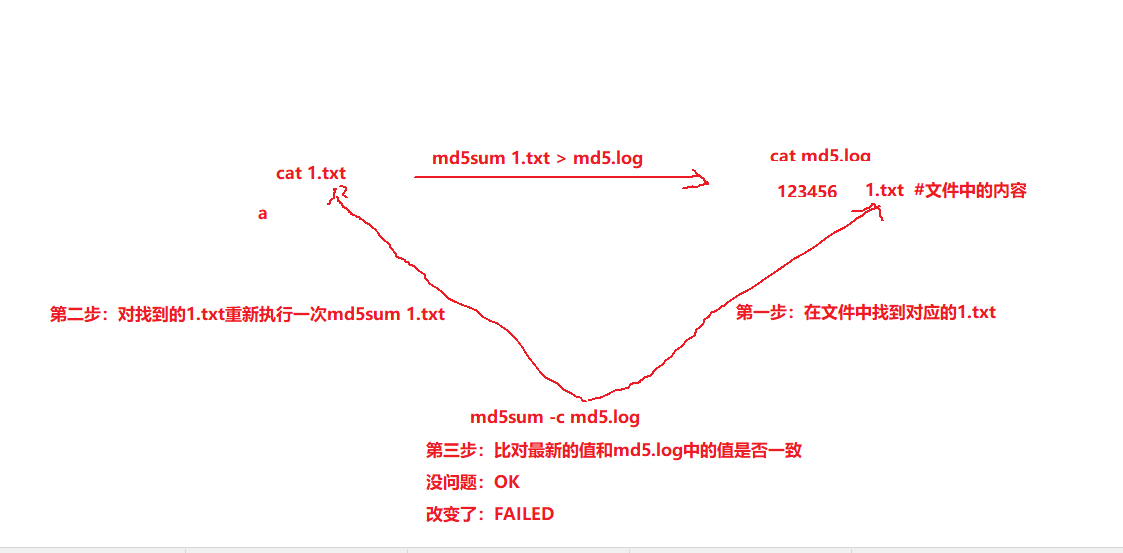
案例1:md5可以给文件的校验值存放到一个文件中统一管理
#1.创建文件
[root@oldboy ~]# echo a > 1.txt
[root@oldboy ~]# echo a > 2.txt
[root@oldboy ~]# ll
total 8
-rw-r--r-- 1 root root 2 Mar 21 06:13 1.txt
-rw-r--r-- 1 root root 2 Mar 21 06:13 2.txt

#2.生成的md5值保存到一个文件中
[root@oldboy ~]# md5sum *.txt > md5.log
[root@oldboy ~]# cat md5.log
60b725f10c9c85c70d97880dfe8191b3  1.txt
60b725f10c9c85c70d97880dfe8191b3  2.txt
[root@oldboy ~]# md5sum -c md5.log
1.txt: OK
2.txt: OK

#修改1.txt 文件
[root@oldboy ~]# echo a>> 1.txt
[root@oldboy ~]#
[root@oldboy ~]# md5sum  -c md5.log
1.txt: FAILED
2.txt: OK
md5sum: WARNING: 1 computed checksum did NOT match
#注意md5做校验的时候最好是用绝对路径
[root@oldboy ~]# md5sum /root/*.txt > /opt/md5.log
[root@oldboy ~]# cat /opt/md5.log
0d227f1abf8c2932d342e9b99cc957eb  /root/1.txt
60b725f10c9c85c70d97880dfe8191b3  /root/2.txt
[root@oldboy ~]# cd /tmp/
[root@oldboy tmp]# md5sum -c /opt/md5.log
/root/1.txt: OK
/root/2.txt: OK

#使用场景,企业中没有完善的监控体系可以使用md5来对文件的监控
案例2:访问主页被篡改www.cjj.com
1.先看服务的配置文件 /etc/nginx/conf/nginx.conf
2.代码目录/data/www/index.php 上千个文件
grep -r www.cjj.com /data/
tar zcvf /tmp/all.tar.gz /data #保留数据-->开发
3.find /data -type f
[root@oldboy ~]# grep -r 'www.cjj.com' data/
data/test/a.html:www.cjj.com
data/index.html:www.cjj.com

[root@oldboy ~]# find data -type f|xargs grep 'www.cjj.com'|awk -F: '{print $1}'|xargs sed -i 's#www.cjj.com#www.oldboy.com#g'
[root@oldboy ~]# cat data/index.html
www.oldboy.com
[root@oldboy ~]# cat data/test/a.html
www.oldboy.com

#目录权限 错误777
#文件权限 错误777
md5sum
find /data -type f|xargs md5sum >/opt/md5.log
定时任务 md5sum -c /opt/md5.log
重点小结
1.用户分类
管理员 0
虚拟用户 1-999
普通用户 1000+
2.passwd每列含义
3.创建用户
centos,kylin系统普通用户
useradd test01
ubt:普通用户
useradd -m -s /bin/bash test01

centos,kylin 虚拟用户指定uid gid
groupadd -g777 test02
useradd -u777 -g777 -M -s /sbin/nologin test02

ubt:
groupadd -g777 test02
useradd -u777 -g777 test02
删除用户:
userdel -r 用户名

设置密码:
交互都相同
passwd 回车
passwd 用户名

非交互
echo 密码|passwd --stdin 用户 #centos、kylin
echo 用户:密码|chpasswd #ubt

密码管理:keepass 禁止使用弱口令

md5sum 掌握
- [x] 今天掌握
- [x] 周终结
- [ ] 录制
正文完