2026年5月13日
`知识点回顾`
ansible
1.ansible是啥
    自动化运维工具,实现批量执行命令...
2.ansible 安装
    ansible基于Python开发
    centos可以直接下载
    kylin系统需要先下载Python在用pip下载
    1、下载Python
    2、安装ansible pip install ansible 指定安装源阿里源
    3、配置
3.Ansible主机清单
基于用户名加密码方式
    1、定义单台
        IP方式:ip ansible_ssh_user=用户 ansible_ssh_password='密码' ansible-ssh_port=端口
        别名方式:别名 ansible_ssh_host=ip ansible_ssh_user=用户 ansible_ssh_password='密码' ansible-ssh_port=端口
        域名方式:域名 ansible_ssh_user=用户 ansible_ssh_password='密码' ansible-ssh_port=端口

    2、定义组
        [组名]
            成员1
            web01 ansible_ssh_user=ip
            成员2
            web02 ansible_ssh_user=ip
        组变量
        [name:vars]
        ansible_ssh_user=root
        ansible_ssh_password=密码
    3、定义子组
        [子组名:children]
            小组1
            webs
            小组2
            mysql

基于免密钥方式
    1、生成密钥对
    ssh-keygen
    2、将公钥拷贝到客户端
    ssh-copy-id 客户端主机ip
    3、配置
    单台:
    web01 ansible_ssh_user=ip

    组
    [组名]
    成员1ip
    成员2ip

    子组
    [name:children]
    组1
    组2
验证是否通
ansible 主机 -m ping

4.Ansible-ad-hoc
通过模块封装操作客户端
常用模块
1.yum   #安装软件
2.file  #文件操作
3.copy  #拷贝复制
4.cron  #定时任务
5.user  #用户创建
6.systemd   #启动
7.commoad   #执行Linux命令不建议
Ansible-Playbook
1.playbook部署web服务
2.playbook重构backup
3.playbook重构NFS
4.playbook重构wp
1.playbook部署web服务
1.恢复web01快照
2.做免秘钥
3.创建yaml语法的文件.yml结尾
4.检查语法
5.执行playbook
6.检查结果
7.完善Nginx服务
1.1.恢复web02快照
1.2.做免秘钥
[root@ansible ~]# ssh-copy-id 10.0.0.8
1.3.创建yaml语法的文件 .yml结尾
主机清单
[root@ansible ansible]# cat /etc/ansible/hosts
web02 ansible_ssh_host=172.16.1.8

1.创建一个专门的目录
[root@ansible ~]# mkdir ansible
[root@ansible ~]# cd ansible/

2.写playbook
playbook: nginx.yml
[root@ansible ansible]# cat nginx.yml
- hosts: web02
  tasks:
    - name: ntpdate
      command: ntpdate ntp1.aliyun.com

    - name: configure repo
      yum_repository:
        baseurl: https://nginx.org/packages/centos/7/$basearch/
        name: nginx
        description: EPEL YUM repo
        gpgcheck: no
        enabled: yes

    - name: install nginx server
      yum:
        name: nginx
        state: present

    - name: startnginx server
      systemd:
        name: nginx
        state: started
        enabled: yes
1.4.检查语法
[root@ansible ansible]# ansible-playbook --syntax-check nginx.yml

playbook: nginx.yml
1.5.执行playbook
[root@ansible ansible]# ansible-playbook nginx.yml
1.6.检查结果
[root@web02 ~]# nginx -v
nginx version: nginx/1.26.1
1.7.完善Nginx服务
1.创建www用户
2.Nginx主配置文件Nginx.conf 用户设置www
3.准备server www.test.com 配置文件拷贝到目标主机
4.对应静态页面 /code/index.html

#需要提前准备的文件
1.nginx.conf--->启动用户修改为www #拷贝到ansible主机手动修改
2.test.conf--->配置server www.test.com 代码目录/code

#写playbook
[root@ansible ansible]# cat nginx.yml
- hosts: web02
  tasks:
    - name: ntpdate
      command: ntpdate ntp1.aliyun.com

    - name: configure repo
      yum_repository:
        baseurl: https://nginx.org/packages/centos/7/$basearch/
        name: nginx
        description: EPEL YUM repo
        gpgcheck: no
        enabled: yes

    - name: install nginx server
      yum:
        name: nginx
        state: present

    - name: create group www
      group:
        name: www
        gid: 666

    - name: create group www
      user:
        name: www
        uid: 666
        group: www
        shell: /sbin/nologin
        create_home: false

    - name: copy nginx.conf to web02
      copy:
        src: nginx.conf
        dest: /etc/nginx/

    - name: copy server
      copy:
        src: test.conf
        dest: /etc/nginx/conf.d/test.conf

    - name: create dir /code
      file:
        path: /code
        state: directory

    - name: create index
      copy:
        content: web02...
        dest: /code/index.html

    - name: startnginx server
      systemd:
        name: nginx
        state: restarted
        enabled: yes

#语法检查
[root@ansible ansible]# ansible-playbook --syntax-check nginx.yml

playbook: nginx.yml

#执行完成
[root@ansible ansible]# ansible-playbook nginx.yml

#hosts解析
10.0.0.8 www.test.com

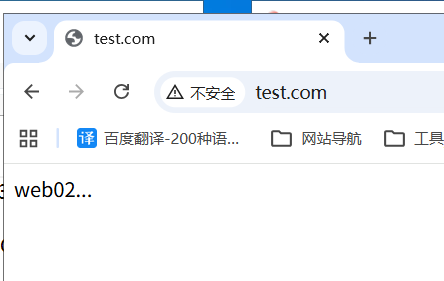
#浏览器访问
www.test.com
2.playbook重构backup
1.将rsyncd.conf收集到Ansible服务器
2.恢复快照
3.免秘钥
4.主机清单
5.写playbook
6.执行测试
2.1.将rsyncd.conf收集到Ansible服务器
[root@ansible ansible]# scp 10.0.0.41:/etc/rsyncd.conf .
2.2.恢复快照
2.3.免密钥
[root@ansible ansible]# ssh-copy-id 10.0.0.41
2.4.主机清单
[root@ansible ansible]# cat /etc/ansible/hosts
web02 ansible_ssh_host=172.16.1.8
backup ansible_ssh_host=172.16.1.41
2.5.写playbook
[root@ansible ansible]# cat backup.yml
- hosts: backup
  tasks:
    - name: install rsync server
      yum:
        name: rsync
        state: present

    - name: configure rsync server
      copy:
        src: rsyncd.conf
        dest: /etc/

    - name: create group www
      group:
        name: www
        gid: 666

    - name: create user www
      user:
        name: www
        uid: 666
        group: www
        shell: /sbin/nologin
        create_home: false

    - name: configure_password file
      copy:
        content: 'rsync_backup:123'
        dest: /etc/rsync.pwd
        mode: 0600

    - name: create dir /backup
      file:
        path: /backup
        state: directory
        owner: www
        group: www

    - name: start rsync server
      systemd:
        name: rsyncd
        state: started
        enabled: yes
[root@ansible ansible]# ansible-playbook --syntax-check backup.yml

playbook: backup.yml
2.6.执行测试
1.执行
[root@ansible ansible]# ansible-playbook backup.yml

2.测试
[root@web02 ~]# rsync -avz /etc/hosts rsync_backup@10.0.0.41::backup
[root@backup ~]# ll /backup/
总用量 4
-rw-r--r-- 1 www www 158  6月 23  2020 hosts
3.playbook重构NFS
1.收集配置文件
2.恢复快照
3.免密钥
4.编写playbook
5.执行测试
6.客户端批量挂载
3.1.收集配置文件
[root@ansible ansible]# scp 10.0.0.31:/etc/exports .
/data/wp 172.16.1.0/24(rw,sync,all_squash,anonuid=666,anongid=666)
3.2.恢复快照
3.3.免秘钥
[root@ansible ansible]# ssh-copy-id 10.0.0.31
3.4.编写playbook
1.主机清单
[root@ansible ~]# cat /etc/ansible/hosts
web02 ansible_ssh_host=172.16.1.8
backup ansible_ssh_host=172.16.1.41
nfs ansible_ssh_host=172.16.1.31
2.编写playbook
[root@ansible ansible]# cat nfs.yml
- hosts: nfs
  tasks:
    - name: install nfs server
      yum:
        name: nfs-utils
        state: present

    - name: configure nfs server
      copy:
        src: exports
        dest: /etc/

    - name: create group www
      group:
        name: www
        gid: 666

    - name: create user www
      user:
        name: www
        uid: 666
        group: www
        shell: /sbin/nologin
        create_home: false

    - name: create dir /data/wp
      file:
        path: /data/wp
        state: directory
        owner: www
        group: www

    - name: start nfs server
      systemd:
        name: nfs
        state: started
        enabled: yes
[root@ansible ansible]# ansible-playbook --syntax-check nfs.yml

playbook: nfs.yml
3.5.执行测试
[root@ansible ansible]# ansible-playbook nfs.yml
[root@ansible ansible]# showmount -e 172.16.1.31
Export list for 172.16.1.31:
/data/wp 172.16.1.0/24

[root@web02 ~]# mount -t nfs 172.16.1.31:/data/wp /mnt/
[root@web02 ~]# df -h|grep 172
172.16.1.31:/data/wp   48G  3.8G   44G    8% /mnt

[root@web02 ~]# touch /mnt/1.txt
[root@nfs ~]#  ll /data/wp/
总用量 0
-rw-r--r-- 1 www www 0  5月 13 19:48 1.txt
3.6.客户端批量挂载
#注意present只写入fstab
[root@ansible ansible]# cat mount.yml
- hosts: webs
  tasks:
    - name: mount nfs /data/wp
      mount:
        src: 172.16.1.31:/data/wp
        path: /mnt
        fstype: nfs
        state: present
[root@ansible ansible]# ansible-playbook mount.yml

#mounted模块挂载并且写入到/etc/fstab
[root@ansible ansible]# cat mount.yml
- hosts: webs
  tasks:
    - name: install nfs server
      yum:
        name: nfs-utils
        state: present

    - name: mount nfs /data/wp
      mount:
        src: 172.16.1.31:/data/wp
        path: /mnt
        fstype: nfs
        state: mounted
[root@ansible ansible]# ansible-playbook --syntax-check mount.yml

playbook: mount.yml

[root@ansible ansible]# ansible-playbook mount.yml

[root@web02 ~]# df -h | grep 172
172.16.1.31:/data/wp   48G  3.8G   45G    8% /mnt
[root@web02 ~]# tail -1 /etc/fstab
172.16.1.31:/data/wp /mnt nfs defaults 0 0


#卸载使用absent
[root@ansible ansible]# cat mount.yml
- hosts: webs
  tasks:
    - name: install nfs server
      yum:
        name: nfs-utils
        state: present

    - name: mount nfs /data/wp
      mount:
        src: 172.16.1.31:/data/wp
        path: /mnt
        fstype: nfs
        state: absent
[root@ansible ansible]# ansible-playbook mount.yml
[root@web02 ~]# tail -1 /etc/fstab
UUID=ba4b226b-59aa-492d-b547-144ac7223707 none                    swap    defaults        0 0
[root@web02 ~]# df -h | grep 172
#unmounted只卸载不删fstab
4.playbook重构wp
分层:框架思维 解耦
硬件--->系统(优化)--->部署服务(优化)--->部署业务--->监控
部署nginx+php+mysql+slb+nfs
部署业务
4.1.部署nginx+php
##web02部署nginx+php
#需要提前将web01服务器上的/etc/php-fpm.d/www.conf拷贝到ansible
[root@ansible ansible]# scp -r 172.16.1.7:/etc/php-fpm.d/www.conf .

1.第一步:写playbook
php插件包格式化列表
[root@ansible ansible]# echo php php-bcmath php-cli php-common php-devel php-embedded php-fpm php-gd php-intl php-mbstring php-mysqlnd php-opcache php-pdo   php-process php-xml php-json|xargs -n1|awk '{print "- "$1}'
[root@ansible ansible]# cat php.yml
- hosts: web02
  tasks:
    - name: install php server
      yum:
       name:
         - php
         - php-bcmath
         - php-cli
         - php-common
         - php-devel
         - php-embedded
         - php-fpm
         - php-gd
         - php-intl
         - php-mbstring
         - php-mysqlnd
         - php-opcache
         - php-pdo
         - php-process
         - php-xml
         - php-json
       state: present

    - name: configure php server
      copy:
        src: www.conf
        dest: /etc/php-fpm.d/

    - name: start php server
      systemd:
        name: php-fpm
        state: started
        enabled: yes

[root@ansible ansible]# ansible-playbook --syntax-check php.yml

playbook: php.yml

2.第二步:执行测试
[root@ansible ansible]# ansible-playbook php.yml
[root@web02 ~]# netstat -tnulp|grep 9000
tcp        0      0 127.0.0.1:9000          0.0.0.0:*               LISTEN      16243/php-fpm: mast
4.2.部署MySQL
1.将部署好的业务导出备份
[root@DB01 ~]# mysqldump -uroot -p'lzy123.com' -A > all.sql
[root@ansible ansible]# scp 172.16.1.51:/root/all.sql .

2.恢复快照
3.免秘钥
[root@ansible ansible]# ssh-copy-id 172.16.1.51

4.主机清单
[root@ansible ~]# cat /etc/ansible/hosts
backup ansible_ssh_host=172.16.1.41
nfs ansible_ssh_host=172.16.1.31
db01 ansible_ssh_host=172.16.1.51

[webs]
web01 ansible_ssh_host=172.16.1.7
web02 ansible_ssh_host=172.16.1.8


5.写playbook
playbook: mysql.yml
[root@ansible ansible]# cat mysql.yml
- hosts: db01
  tasks:
    - name: install mariadb server
      yum:
        name:
          - mariadb-server
          - python3-mysqlclient
        state: present

    - name: start mariadb server
      systemd:
        name: mariadb
        state: started
        enabled: yes

    - name: create database wp
      mysql_db:
        login_host: localhost
        login_user: root
        login_port: 3306
        name: wp
        state: present

    - name: create remot lzy
      mysql_user:
        login_host: localhost
        login_user: root
        name: lzy
        password: lzy123.com
        priv: '*.*:ALL'
        host: '%'
        state: present
[root@ansible ansible]# ansible-playbook --syntax-check mysql.yml

playbook: mysql.yml

6.执行测试
[root@ansible ansible]# ansible-playbook mysql.yml
[root@DB01 ~]# mysql -ulzy -plzy123.com -e 'show databases;'
+--------------------+
| Database           |
+--------------------+
| information_schema |
| mysql              |
| performance_schema |
| wp                 |
+--------------------+
4.3.部署wp业务
1.删除nginx默认default.conf
2.nginx配置wp业务server
[root@ansible ansible]# cat wp.conf
server {
    listen 80;
    server_name www.wp.com;
    location / {
        root /code/wordpress;
        index index.php index.html;
    }

    location ~ \.php$ {
        root /code/wordpress;
        fastcgi_pass 127.0.0.1:9000;
        fastcgi_param SCRIPT_FILENAME $document_root$fastcgi_script_name;
        include fastcgi_params;
    }
}

3.下载WordPress的代码文件解压到/code/wp 编写playbook
[root@ansible ansible]# cat wp.yml
- hosts: web02
  tasks:
    - name: delete default.conf
      file:
        path: /etc/nginx/conf.d/default.conf
        state: absent

    - name: configure wp server
      copy:
        src: wp.conf
        dest: /etc/nginx/conf.d/

    - name: create /code/dir
      file:
        path: /code
        state: directory

    - name: wget code wordpress
      get_url:
        url: https://cn.wordpress.org/wordpress-6.2.9-zh_CN.tar.gz
        dest: /opt/

    - name: unarchive wp code to /code
      unarchive:
        src: /opt/wordpress-6.2.9-zh_CN.tar.gz
        dest: /code/
        remote_src: yes
        owner: www
        group: www
        creates: /code/wordpress

    - name: restart nginx server
      systemd:
        name: nginx
        state: restarted
[root@ansible ansible]# ansible-playbook --syntax-check wp.yml

playbook: wp.yml


4.执行测试
[root@ansible ansible]# ansible-playbook wp.yml

hosts解析
10.0.0.8 www.wp.com

浏览器访问
www.wp.com
正文完