2026年4月23日
知识点回顾
1.wordperss项目搭建
    1.配置server
    2.上传业务代码
    3.hosts解析
    4.页面安装
        1.创建数据库
        mysql -uroot -p'密码' -e "create database wp"
        mysql -uroot -p'密码' -e "show databases"
        2.站点目录权限修改
        chown apache.apache /code/wp
        3.访问页面按提示填写数据库信息安装
2.zh项目搭建
    1.配置server
    2.上传业务代码
    3.hosts解析
    3.页面安装
        1.数据库创建
        2.站点目录权限修改
3.数据库迁移
    1.准备一台虚拟机
    2.安装数据库
        1.yum -y install mariadb-server
        2.systemctl start mariadb
        3.systemctl enable mariadb
        4.导出原数据库文件,再导出
        mysqldump
        5.修改数据库指向

4.扩展web02,保证静态数据一致性
1.准备工作
web01:部署nginx+php
web02:部署nginx+php
nfs:部署nfs
db01:部署MySQL

2.修改配置
静态资源挂载
01.扩展web02
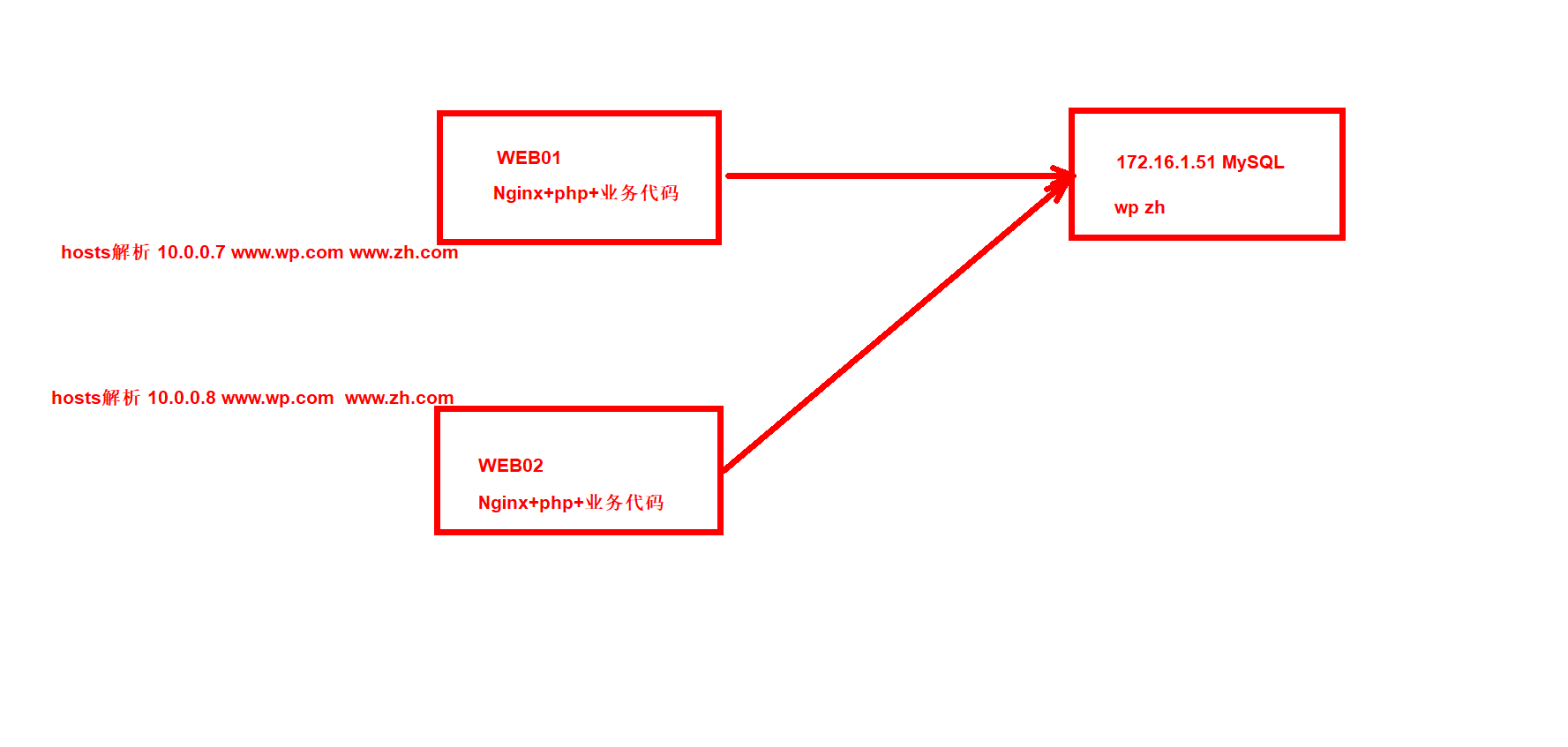
1.克隆一台web01
2.安装nginx
3.安装php
4.将web01的server 业务zh和wp拷贝到web01
5.修改php监听端口
6.将/code拷贝到web02
7.启动nginx和php服务加入卡机自启
8.测试hosts解析到web02访问业务一模一样
1.克隆一台web01
克隆模版机
2.安装nginx
1.配置官方仓库
[root@web02 ~]# scp 10.0.0.7:/etc/yum.repos.d/nginx.repo /etc/yum.repos.d/
2.安装nginx
[root@web02 ~]# yum -y install nginx
3.安装PHP
[root@web02 ~]# yum -y install php php-bcmath php-cli php-common php-devel php-embedded php-fpm php-gd php-intl php-mbstring php-mysqlnd php-opcache php-pdo php-process php-xml php-json
4.将web01的server 业务zh和wp拷贝到web02
1.将默认的default.conf删除
[root@web02 ~]# rm -rf /etc/nginx/conf.d/*

2.拷贝server
[root@web02 ~]# scp 10.0.0.7:/etc/nginx/conf.d/* /etc/nginx/conf.d/
5.修改php监听端口
[root@web02 ~]# vim /etc/php-fpm.d/www.conf
listen = 127.0.0.1:9000
6.将/code拷贝到web02
1.web01打包代码
[root@web01 code]# tar -zcvf all.tar.gz wp/ zh/
[root@web01 code]# scp all.tar.gz 10.0.0.8:/code/

2.web02解压
[root@web02 code]# tar -xf all.tar.gz

3.属主属组
[root@web02 code]# chown -R apache.apache wp/ zh/
7.启动nginx和php服务加入开机自启
[root@web02 code]# systemctl start nginx php-fpm
[root@web02 code]# systemctl enable nginx php-fpm
8.测试hosts解析到web02访问业务一模一样
1.手动改解析ip
10.0.0.8 www.wp.com www.zh.com

2.访问测试
www.wp.com
www.zh.com
02.NFS实现数据一致性
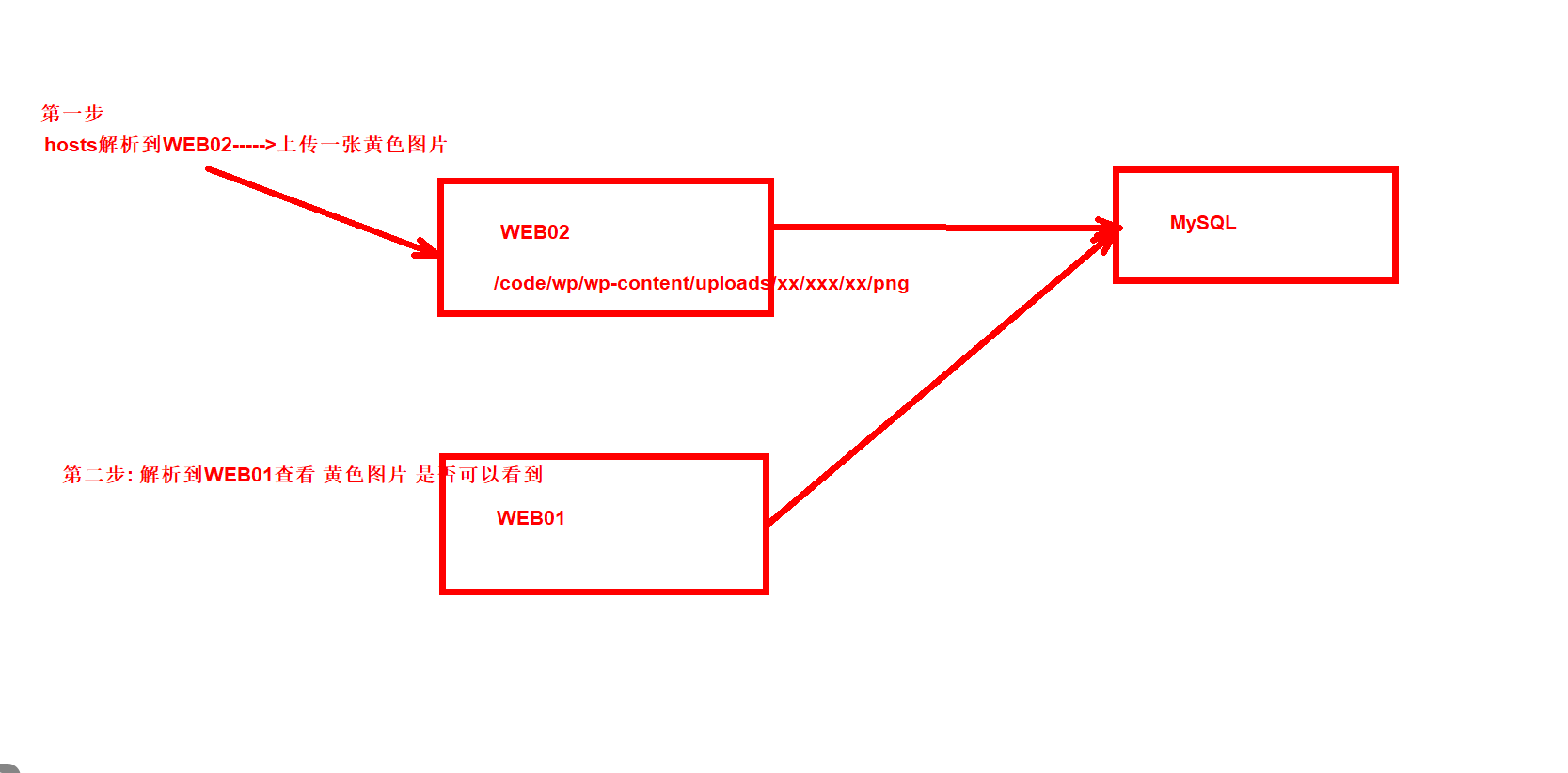
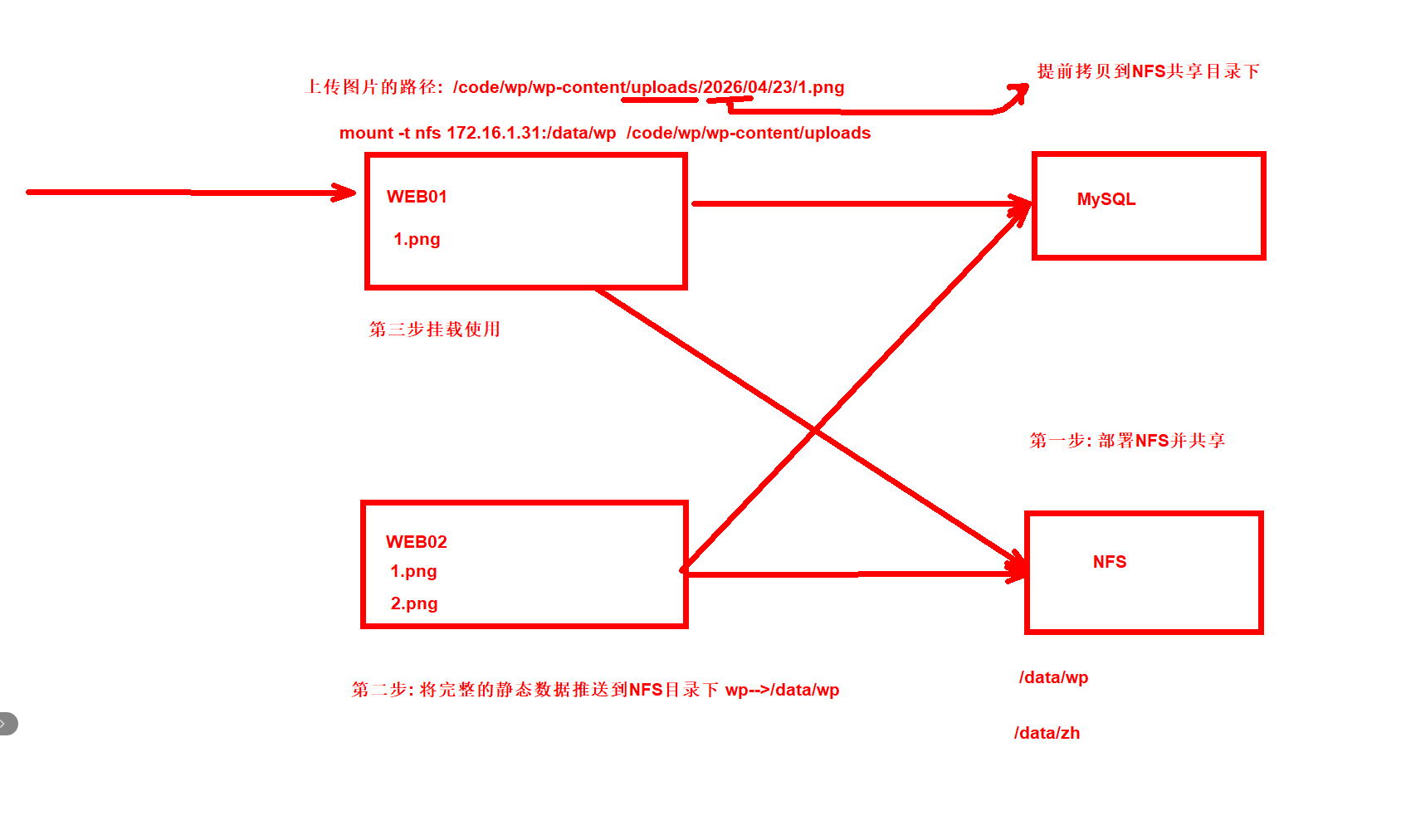
解决数据一致性问题
1.部署NFS服务
2.将web服务器上最完整的静态数据拷贝到NFS的共享目录下
3.盖章到web
4.写到开机自动挂载fstab
5.修改nfs的共享目录权限为压缩后的用户www
1.部署nfs服务
[root@nfs ~]# yum -y install nfs-utils
[root@nfs ~]# cat /etc/exports
/data/wp 172.16.1.0/24(rw,sync,all_squash,anonuid=666,anongid=666)
/data/zh 172.16.1.0/24(rw,sync,all_squash,anonuid=666,anongid=666)

[root@nfs ~]# mkdir -p /data/{wp,zh}
[root@nfs ~]# systemctl start nfs
[root@nfs ~]# systemctl enable nfs
2.将web服务器上最完整的静态数据拷贝到nfs的共享目录下
[root@web02 ~]# scp -r /code/wp/wp-content/uploads/* 10.0.0.31:/data/wp/
3.挂载到web
[root@web01 code]# mount -t nfs 172.16.1.31:/data/wp /code/wp/wp-content/uploads/
[root@web02 ~]# mount -t nfs 172.16.1.31:/data/wp /code/wp/wp-content/uploads/
4.写到开机自动挂载fstab
[root@web01 ~]# tail -1 /etc/fstab
172.16.1.31:/data/wp /code/wp/wp-content/uploads/ nfs defaults 0 0
[root@web02 ~]# tail -1 /etc/fstab
172.16.1.31:/data/wp /code/wp/wp-content/uploads/ nfs defaults 0 0
5.修改nfs的共享目录权限为压缩的用户www
[root@nfs ~]# groupadd -g666 www
[root@nfs ~]# useradd -u666 -g666 -M -s /sbin/nologin www
[root@nfs ~]# chown -R www.www /data/*      #才可以上传静态图片

[root@nfs ~]# ll /data/
总用量 0
drwxr-xr-x 3 www www 18  4月 23 15:25 wp
drwxr-xr-x 2 www www  6  4月 23 15:21 zh
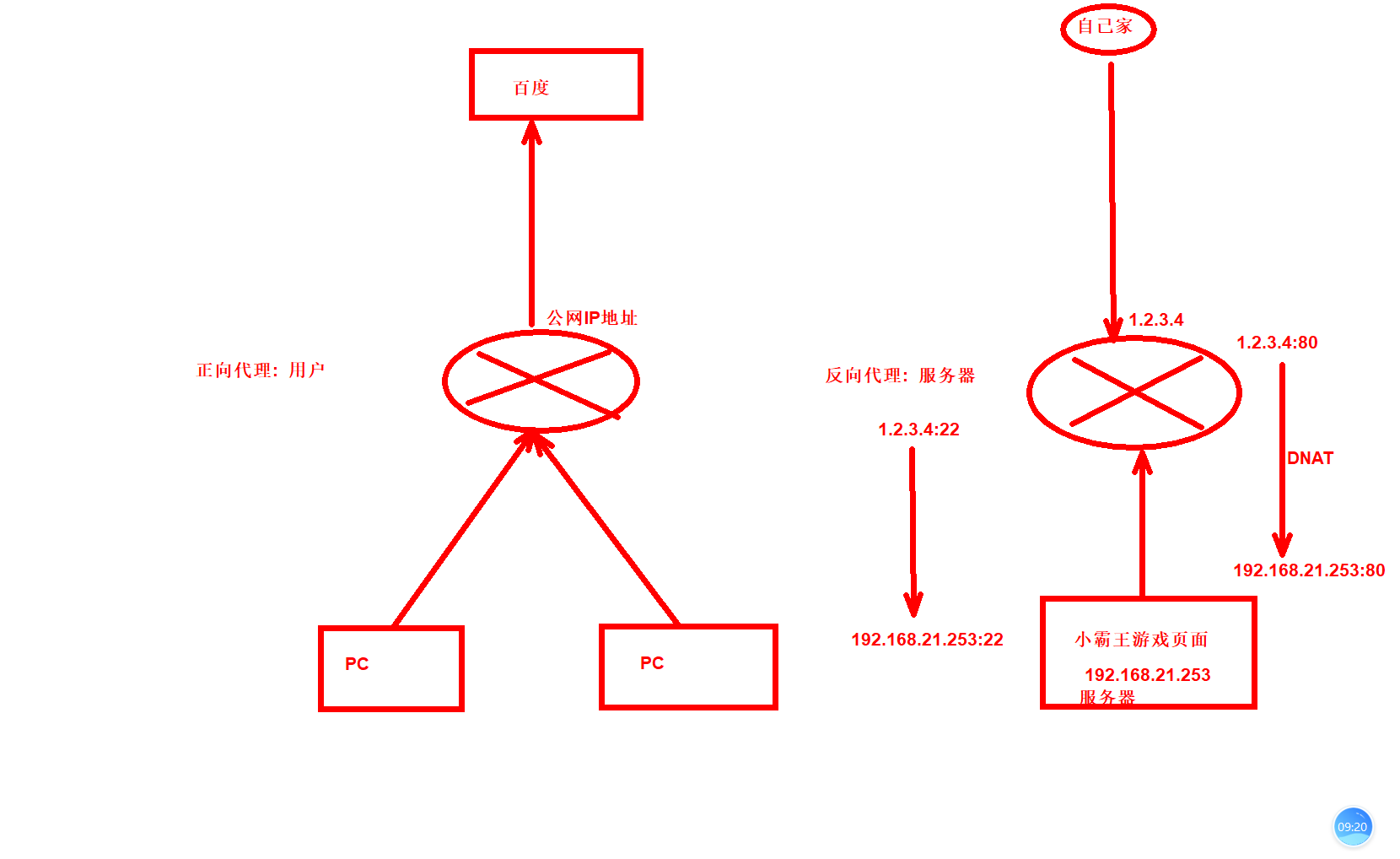
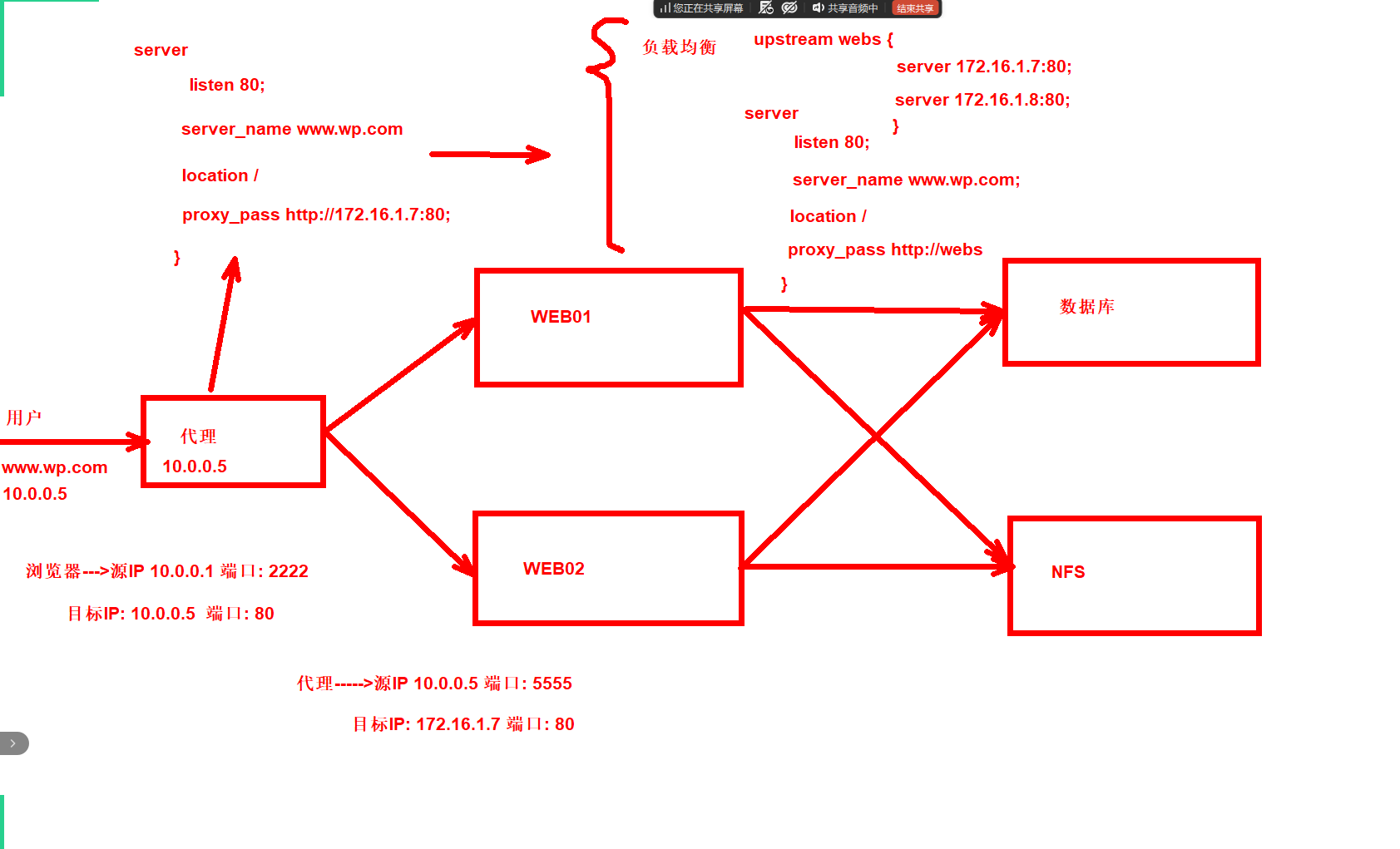
03.代理
04.配置负载
1.克隆一台lb01
2.安装nginx
3.配置nginx为负载均衡
4.hosts解析到负载均衡
5.携带参数最终的负载均衡配置
6.验证测试
1.克隆一台lb01
1.克隆模板机
2.改主机名 lb01
3.改ip 10.0.0.5
2.安装nginx
[root@lb01 ~]# scp 10.0.0.7:/etc/yum.repos.d/nginx.repo /etc/yum.repos.d/
[root@lb01 ~]# yum -y install nginx
3.配置nginx为负载均衡
[root@lb01 conf.d]# cat lb.conf
upstream webs {
    server 172.16.1.7:80;
    server 172.16.1.8:80;
}

server {
    listen 80;
    server_name www.wp.com;

    location / {
        proxy_pass http://webs;
    }
}
[root@lb01 conf.d]# nginx -t
nginx: the configuration file /etc/nginx/nginx.conf syntax is ok
nginx: configuration file /etc/nginx/nginx.conf test is successful
[root@lb01 conf.d]# systemctl restart nginx
4.hosts解析到负载均衡
10.0.0.5 www.wp.com www.zh.com
5.携带参数最终的负载均衡配置
1.参数变量写入/etc/nginx/proxy_params
[root@lb01 nginx]# cat proxy_params
proxy_set_header Host $http_host;
proxy_http_version 1.1;
proxy_set_header X-Forwarded-For $proxy_add_x_forwarded_for;

proxy_connect_timeout 30;
proxy_send_timeout 60;
proxy_read_timeout 60;
proxy_buffering on;
proxy_buffer_size 32k;
proxy_buffers 4 128k;

2.server中直接引用
[root@lb01 conf.d]# cat lb.conf
upstream webs {                 #地址池
    server 172.16.1.7:80;
    server 172.16.1.8:80;
}

server {
    listen 80;
    server_name www.wp.com;

    location / {
        proxy_pass http://webs;
        include proxy_params;           #引用参数
    }
}
server {
        listen 80;
        server_name www.zh.com;

        location / {
                proxy_pass http://webs;
                include proxy_params;
        }
}
[root@lb01 conf.d]# nginx -t
nginx: the configuration file /etc/nginx/nginx.conf syntax is ok
nginx: configuration file /etc/nginx/nginx.conf test is successful
[root@lb01 conf.d]# systemctl restart nginx
6.验证测试
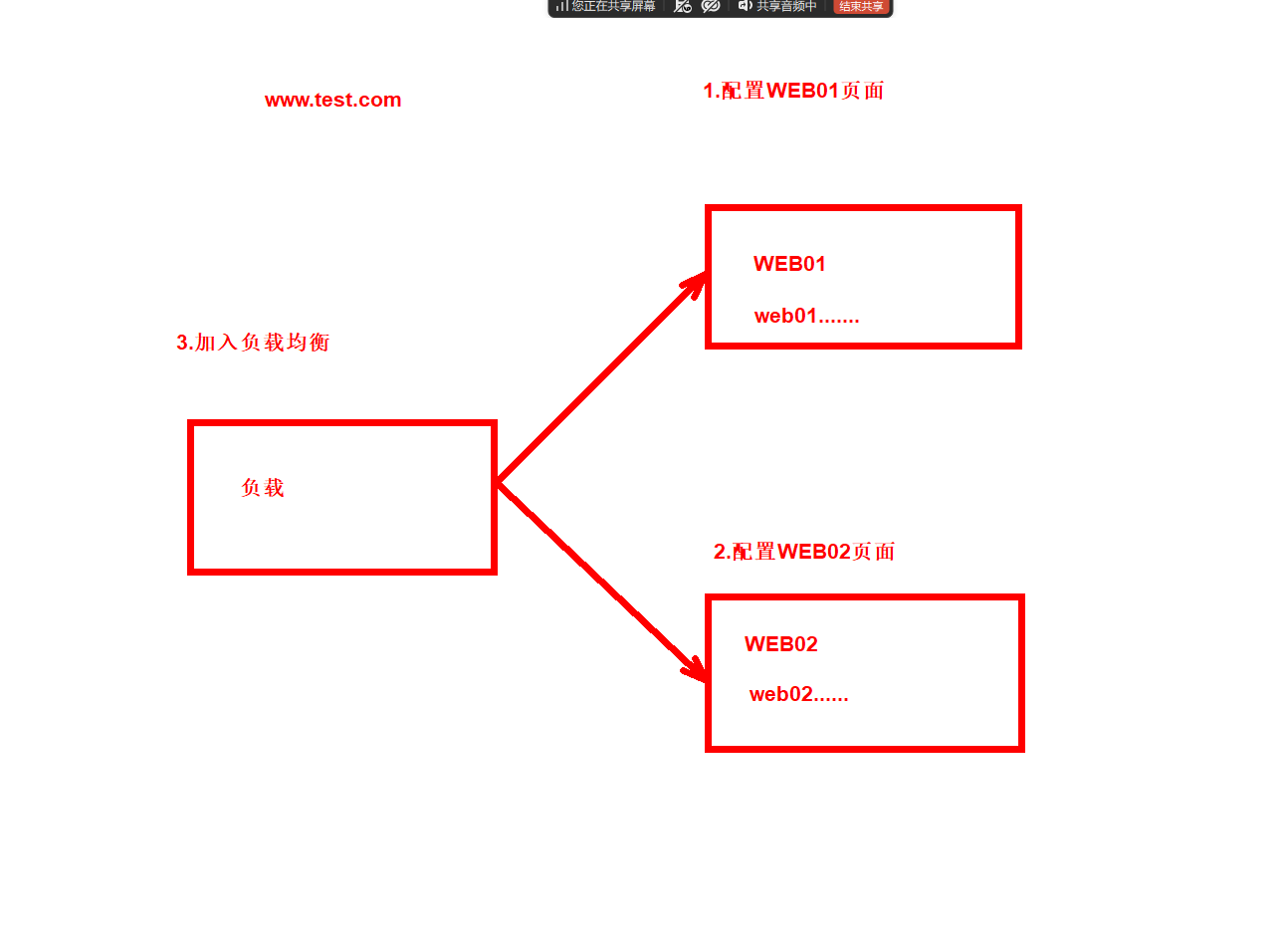
1.配置web01的静态页面
server {
    listen 80;
    server_name www.test.com;
    root /code/test;
    index index.html;
}
[root@web01 conf.d]# mkdir /code/test
[root@web01 conf.d]# echo web01... > /code/test/index.html
[root@web01 conf.d]# nginx -t
nginx: the configuration file /etc/nginx/nginx.conf syntax is ok
nginx: configuration file /etc/nginx/nginx.conf test is successful
[root@web01 conf.d]# systemctl restart nginx

2.配置web02的静态页面
[root@web02 conf.d]# cat test.conf
server {
    listen 80;
    server_name www.test.com;

    root /code/test;
    index index.html;
}
[root@web02 conf.d]# mkdir /code/test
[root@web02 conf.d]# echo web02... > /code/test/index.html
[root@web02 conf.d]# nginx -t
nginx: the configuration file /etc/nginx/nginx.conf syntax is ok
nginx: configuration file /etc/nginx/nginx.conf test is successful
[root@web02 conf.d]# systemctl restart nginx

3.接入负载均衡
[root@lb01 conf.d]# cat test.conf
server {
    listen 80;
    server_name www.test.com;
    location / {
        proxy_pass http://webs;
        include proxy_params;
    }
}
[root@lb01 conf.d]# nginx -t
nginx: the configuration file /etc/nginx/nginx.conf syntax is ok
nginx: configuration file /etc/nginx/nginx.conf test is successful
[root@lb01 conf.d]# systemctl restart nginx

4.将www.test.com解析到负载均衡
10.0.0.5 www.wp.com www.zh.com www.test.com
预习:
#proxy_next_upstream
作用:让 Nginx 遇到后端 500/502 ...错误时,自动转发到下一台正常服务器。

proxy_next_upstream error timeout invalid_header http_500 http_502 http_503 http_504;
正文完