2026年4月24日
知识点回顾
1.扩展web02
    1.Nginx官方yum仓库配置,从web01拷贝
    2.安装Nginx yum -y install nginx 注意系统时间同步
    3.从web01拷贝业务代码
    4.修改php ip
    5.从web01拷贝Nginx配置
    6启动并自启服务
    7.修改站点目录权限
    8.访问测试
2.保证数据一致性
    解决方法:静态数据用共享文件系统nfs
            动态数据用同一个数据库服务
        1.安装nfs yum -y install nfs-utils
        2.配置服务/etc/exports 共享目录 ip段(权限,sync,all_squash,auonuid=uid,auongid=gid)
        3.创建共享目录
        4.修改属主属组
        5.启动服务
        web01,web02挂载 showmount -e ip   mount -t nfs 共享目录 挂载目录
3.代理
正向代理:内网出公网
反向代理:公网进内网
负载均衡:一对多
4.负载均衡
 实现方法:定义地址池upstearm 池名 {ip:端口} 引用地址池 location {parxy_pass http://池名}
 1.克隆一台lb01
 2.拷贝官方Nginx yum库配置
 3.安装Nginx
 4.配置复制均衡 vim /etc/nginx/conf.d/lb01.conf
 upstearm webs {
    10.0.0.7:80
    10.0.0.8:80
 }

 server {
    listen 80;
    server_name www.wp.com;

    location / {
        parxy_pass http://webs;
    }
 }

 nginx -t
 systemctl start nginx
 systemctl enable nginx

5修改hosts解析为lb01 ip
01.七层和四层区别
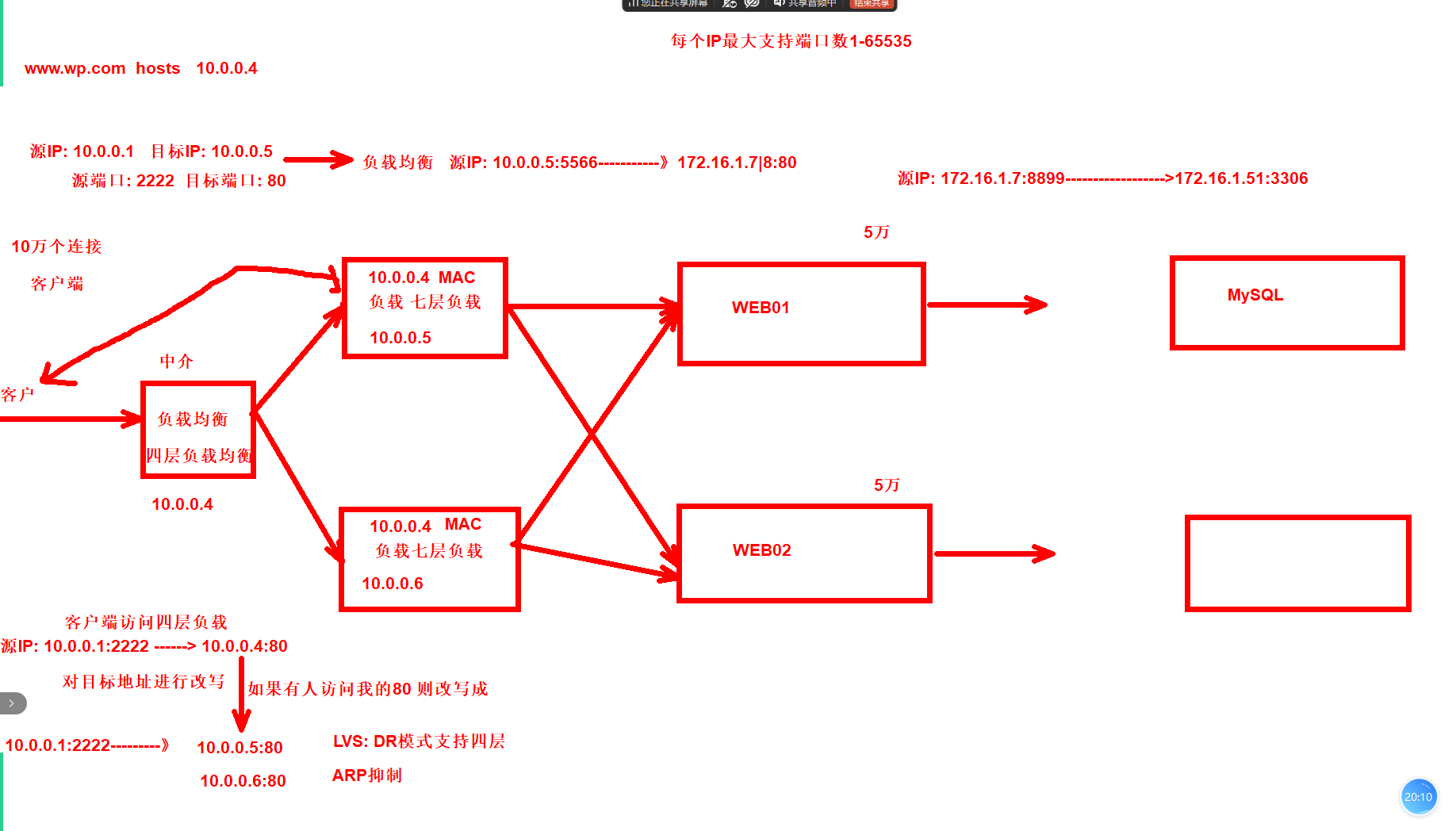
02.后端错误状态码
负载均衡的后端Nginx自己状态检查,如果后端Nginx挂掉,不影响用户,默认自动访问正常运行的web服务
如果后端web的数据相关的服务挂掉,没有办法检查的,我们需要再负载均衡配置如果遇到500相关的后端错误,直接访问下个server
#主要参数:proxy_next_upstream error timeout http_500 http_502 http_503 http_504;

[root@lb01 ~]# cat /etc/nginx/conf.d/lb.conf
upstream webs {
    server 172.16.1.7:80;
    server 172.16.1.8:80;
}

server {
    listen 80;
    server_name www.wp.com;

    location / {
        proxy_pass http://webs;
        include proxy_params;
        proxy_next_upstream error timeout http_500 http_502 http_503 http_504;
    }
}
server {
        listen 80;
        server_name www.zh.com;

        location / {
                proxy_pass http://webs;
                include proxy_params;
        }
}

[root@lb01 ~]# nginx -t
nginx: the configuration file /etc/nginx/nginx.conf syntax is ok
nginx: configuration file /etc/nginx/nginx.conf test is successful
[root@lb01 ~]# systemctl restart nginx
---------------
手动挂一台服务测试
[root@web02 ~]# systemctl stop php-fpm.service
http://www.wp.com/
03.Nginx调度
面试题:怎么实现的负载均衡
通过Nginx实现的,通过Nginx里面的upstream模块和proxy_pass模块实现。

面试题:你说一下负载均衡的调度算法
| 轮询 | 按时间顺序逐一分配到不同的后端服务器(默认) |
|---|---|
| weight | 加权轮询,weight值越大,分配到的访问几率越高 |
| ip_hash | 每个请求按访问IP的hash结果分配,这样来自同一IP的固定访问一个后端服务器 |
| url_hash | 按照访问URL的hash结果来分配请求,是每个URL定向到同一个后端服务器 |
| least_conn | 最少链接数,那个机器链接数少就分发 |
1.weight 加权轮询,服务器配置不同的情况下使用
[root@lb01 conf.d]# cat lb.conf
upstream webs {
    server 172.16.1.7:80 weight=5;
    server 172.16.1.8:80;
}

server {
    listen 80;
    server_name www.wp.com;

    location / {
        proxy_pass http://webs;
        include proxy_params;
        proxy_next_upstream error timeout http_500 http_502 http_503 http_504;
    }
}
server {
        listen 80;
        server_name www.zh.com;

        location / {
                proxy_pass http://webs;
                include proxy_params;
        }
}
[root@lb01 conf.d]# nginx -t
nginx: the configuration file /etc/nginx/nginx.conf syntax is ok
nginx: configuration file /etc/nginx/nginx.conf test is successful
[root@lb01 conf.d]# systemctl restart nginx
--------测试访问
http://www.test.com/
2.ip_hash 以客户端的ip地址来进行固定到后端web,比如来源IP10.0.0.1第一次分配到了web02,那么后面一直分配给web02
优点:可以实现会话保存
缺点:负载均衡不均衡
[root@lb01 conf.d]# cat lb.conf
upstream webs {
    server 172.16.1.7:80;
    server 172.16.1.8:80;
    ip_hash;
}

server {
    listen 80;
    server_name www.wp.com;

    location / {
        proxy_pass http://webs;
        include proxy_params;
        proxy_next_upstream error timeout http_500 http_502 http_503 http_504;
    }
}
server {
        listen 80;
        server_name www.zh.com;

        location / {
                proxy_pass http://webs;
                include proxy_params;
        }
}
[root@lb01 conf.d]# nginx -t
nginx: the configuration file /etc/nginx/nginx.conf syntax is ok
nginx: configuration file /etc/nginx/nginx.conf test is successful
[root@lb01 conf.d]# systemctl restart nginx
-------测试访问
http://www.test.com/
3.后端服务器的状态
down #不参与调度
backup #当其他的web全都挂掉,他才顶上类似备胎
[root@lb01 conf.d]# cat lb.conf
upstream webs {
    server 172.16.1.7:80 backup;
    server 172.16.1.8:80;
}

server {
    listen 80;
    server_name www.wp.com;

    location / {
        proxy_pass http://webs;
        include proxy_params;
        proxy_next_upstream error timeout http_500 http_502 http_503 http_504;
    }
}
server {
        listen 80;
        server_name www.zh.com;

        location / {
                proxy_pass http://webs;
                include proxy_params;
        }
}
[root@lb01 conf.d]# nginx -t
nginx: the configuration file /etc/nginx/nginx.conf syntax is ok
nginx: configuration file /etc/nginx/nginx.conf test is successful
[root@lb01 conf.d]# systemctl restart nginx
------------测试访问
[root@web02 conf.d]# systemctl stop nginx
http://www.test.com/
[root@web02 conf.d]# systemctl start nginx
http://www.test.com/
04.编译安装
准备:安装依赖
yum install -y gcc glibc gcc-c++ pcre-devel openssl-devel patch
1.下载源码
    1.下载需要添加的模块
    2.解压源码和插件
    3.打补丁(将模块放到默认的配置中)
2.配置 # ./configure
3.编译 #make
4.安装 #make install
1.下载源码
[root@lb01 ~]# wget http://nginx.org/download/nginx-1.26.1.tar.gz
1.1.下载需要添加的模块
上传插件
master.zip
1.2.解压源码和插件
[root@lb01 ~]# tar xf nginx-1.26.1.tar.gz
[root@lb01 ~]# unzip master.zip
1.3.打补丁(将模块放到默认的配置中)
patch -p # -p1在源码中,-p0不在源码中
#进入到源目录 使用patch配置
[root@lb01 ~]# cd nginx-1.26.1/
[root@lb01 nginx-1.26.1]# patch -p1 < ../nginx_upstream_check_module-master/check_1.20.1+.patch
2.配置
1.[root@lb01 nginx-1.26.1]# nginx -V    #查出原有模块配置
2.将扩展模块添加到里面后执行
./configure --prefix=/etc/nginx --sbin-path=/usr/sbin/nginx --modules-path=/usr/lib64/nginx/modules --conf-path=/etc/nginx/nginx.conf --error-log-path=/var/log/nginx/error.log --http-log-path=/var/log/nginx/access.log --pid-path=/var/run/nginx.pid --lock-path=/var/run/nginx.lock --http-client-body-temp-path=/var/cache/nginx/client_temp --http-proxy-temp-path=/var/cache/nginx/proxy_temp --http-fastcgi-temp-path=/var/cache/nginx/fastcgi_temp --http-uwsgi-temp-path=/var/cache/nginx/uwsgi_temp --http-scgi-temp-path=/var/cache/nginx/scgi_temp --user=nginx --group=nginx --with-compat --with-file-aio --with-threads --with-http_addition_module --with-http_auth_request_module --with-http_dav_module --with-http_flv_module --with-http_gunzip_module --with-http_gzip_static_module --with-http_mp4_module --with-http_random_index_module --with-http_realip_module --with-http_secure_link_module --with-http_slice_module --with-http_ssl_module --with-http_stub_status_module --with-http_sub_module --with-http_v2_module --with-mail --with-mail_ssl_module --add-module=/root/nginx_upstream_check_module-master --with-stream --with-stream_realip_module --with-stream_ssl_module --with-stream_ssl_preread_module --with-cc-opt='-O2 -g -pipe -Wall -Wp,-D_FORTIFY_SOURCE=2 -fexceptions -fstack-protector-strong --param=ssp-buffer-size=4 -grecord-gcc-switches -m64 -mtune=generic -fPIC' --with-ld-opt='-Wl,-z,relro -Wl,-z,now -pie'
3.编译
[root@lb01 nginx-1.26.1]# make
4.安装
[root@lb01 nginx-1.26.1]# make install
5.测试
[root@lb01 conf.d]# cat lb.conf
upstream webs{
    server 172.16.1.7:80 max_fails=2 fail_timeout=10s;
    server 172.16.1.8:80 max_fails=2 fail_timeout=10s;
    check interval=3000 rise=2 fall=3 timeout=1000 type=tcp;
}

server {
    listen 80;
    server_name www.wp.com;

    location / {
        proxy_pass http://webs;
        include proxy_params;

        #proxy_next_upstream error timeout http_500 http_502 http_503 http_504;
        location /upstream_check {
                check_status;
            }
    }
}
server {
        listen 80;
        server_name www.zh.com;

        location / {
                proxy_pass http://webs;
                include proxy_params;
        }
}
[root@lb01 conf.d]# nginx -t
nginx: the configuration file /etc/nginx/nginx.conf syntax is ok
nginx: configuration file /etc/nginx/nginx.conf test is successful
[root@lb01 conf.d]# systemctl restart nginx

------------测试访问
http://www.wp.com/upstream_check
05.会话保持
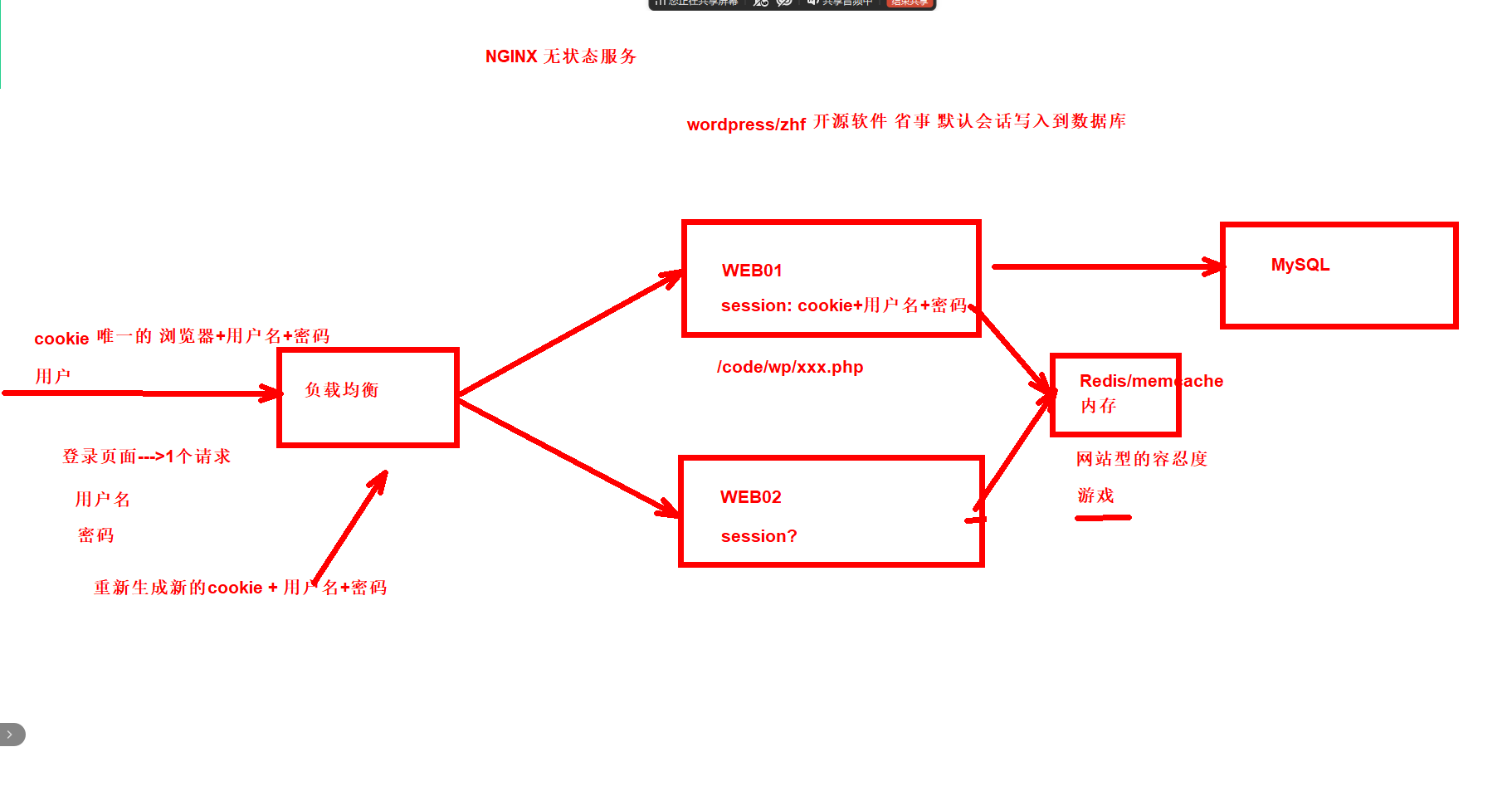
部署默认将会话存储到本地的业务phpmyadmin
#部署web01
1.web01配置Nginx的server
2.上传代码到/code/php
3.修改配置文件、默认的是一个示例文件需要修改名称
4.修改配置文件中的host指向到我们的数据库
5.hosts解析
6.访问登录测试
#部署web02
1.部署web01
1.1.配置Nginx的server
[root@web01 conf.d]# cat php.conf
server {
    listen 80;
    server_name www.php.com;

    location / {
        root /code/php;
        index index.php index.html;
    }

    location ~ \.php$ {
        root /code/php;
        fastcgi_pass 127.0.0.1:9000;
        fastcgi_param SCRIPT_FILENAME $document_root$fastcgi_script_name;
        include fastcgi_params;
    }
}
[root@web01 conf.d]# nginx -t
nginx: the configuration file /etc/nginx/nginx.conf syntax is ok
nginx: configuration file /etc/nginx/nginx.conf test is successful
[root@web01 conf.d]# systemctl restart nginx
1.2.上传代码到/code/php
[root@web01 conf.d]# mkdir /code/php
[root@web01 conf.d]# cd /code/php
[root@web01 php]# ll
总用量 15416
-rw-r--r-- 1 root root 15782614  8月 15  2025 phpMyAdmin-5.2.2-all-languages.zip
1.3.修改配置文件、默认的是一个示例文件需要修改名称
[root@web01 php]# unzip phpMyAdmin-5.2.2-all-languages.zip
[root@web01 php]# mv phpMyAdmin-5.2.2-all-languages/* .
[root@web01 php]# mv config.sample.inc.php config.inc.php
1.4.修改配置文件中的host指向到我们的数据库
[root@web01 php]# grep 'host' config.inc.php
$cfg['Servers'][$i]['host'] = '172.16.1.51';
// $cfg['Servers'][$i]['controlhost'] = '';
1.5.hosts解析
10.0.0.7 www.php.com
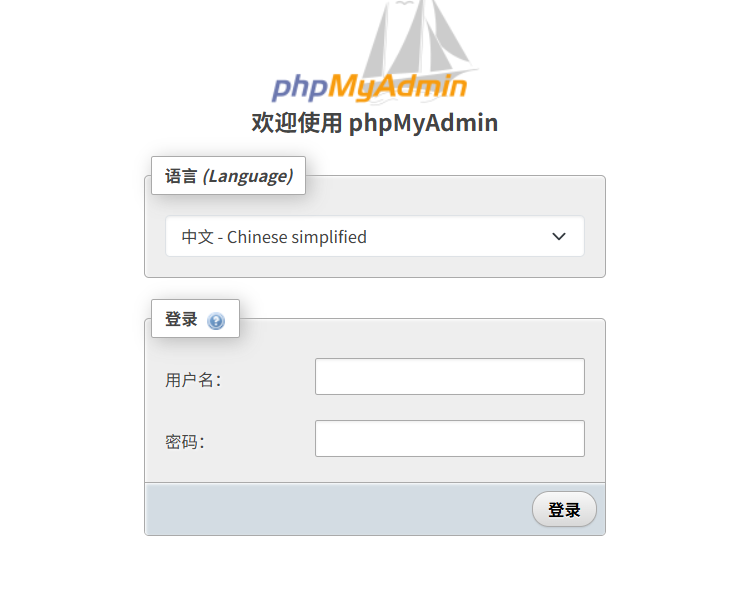
1.6.访问登录测试
2.部署web2
1.配置好的业务直接拷贝给web02
2.hosts解析到web02
2.1.配置好的业务直接拷贝给web01
[root@web01 ~]# scp -r /etc/nginx/conf.d/php.conf 10.0.0.8:/etc/nginx/conf.d/
[root@web01 ~]# scp -r /code/php/ 10.0.0.8:/code/
[root@web02 ~]# nginx -t
nginx: the configuration file /etc/nginx/nginx.conf syntax is ok
nginx: configuration file /etc/nginx/nginx.conf test is successful
[root@web02 ~]# systemctl restart nginx
2.2.hosts解析到web02
10.0.0.8 www.php.com
3.接入负载均衡
会话存放的位置:/var/lib/php/session/
------------------------
[root@lb01 conf.d]# cat php.conf
server {
    listen 80;
    server_name www.php.com;
    location / {
        proxy_pass http://webs;
        include proxy_params;
    }
}
[root@lb01 conf.d]# nginx -t
nginx: the configuration file /etc/nginx/nginx.conf syntax is ok
nginx: configuration file /etc/nginx/nginx.conf test is successful
[root@lb01 conf.d]# systemctl restart nginx
------------
#hosts解析到lb
10.0.0.5 www.php.com
06.部署Redis
#在10.0.0.51 上部署redis服务
MySQL 3306
redis 6379

1.安装
2.配置
3.重启生效

#web01配置将会话指向到redis

#web02配置将会话指向到redis
1.在51上部署Redis
1.1.安装
[root@DB01 ~]# yum -y install redis
1.2.配置
[root@DB01 ~]# grep -E '123456|172.16' /etc/redis.conf
bind 127.0.0.1 172.16.1.51
requirepass 123456
1.3.重启生效
[root@DB01 ~]# systemctl start redis
[root@DB01 ~]# systemctl enable redis
2.web01配置将会话指向到redis
1.编译php安装连接redis的插件
2.1.编译php安装连接redis的插件
第一步:下载redis源码包
[root@web01 ~]# wget https://pecl.php.net/get/redis-5.3.7.tgz

第二步:解压代码
[root@web01 ~]# tar -zxvf redis-5.3.7.tgz

第三步:配置
[root@web01 ~]# cd redis-5.3.7/
[root@web01 redis-5.3.7]# phpize
[root@web01 redis-5.3.7]# ./configure

第四步: 编译安装
[root@web01 redis-5.3.7]# make && make install

第五步:开启redis插件功能,配置文件增加以下一行内
[root@web01 ~]# grep redis.so /etc/php.ini -n
1358:extension=redis.so
2.2.配置php.ini php-fpm.d/www.conf
1)php.ini
[root@web01 ~]# grep -E '172.16|redis' /etc/php.ini
session.save_handler = redis
session.save_path = "tcp://172.16.1.51:6379?auth=123456"

2)/etc/php-fpm.d/www.conf
[root@web01 ~]# tail -4 /etc/php-fpm.d/www.conf
;php_value[session.save_handler] = files                    #注释
;php_value[session.save_path]    = /var/lib/php/session     #注释
php_value[soap.wsdl_cache_dir]  = /var/lib/php/wsdlcache
;php_value[opcache.file_cache]  = /var/lib/php/opcache
2.3.重启生效
[root@web01 ~]# systemctl restart php-fpm.service
3.web02配置指向redis
3.1.下载redis源码包
[root@web02 ~]# wget https://pecl.php.net/get/redis-5.3.7.tgz
3.2.解压代码
[root@web02 ~]# tar -zxvf redis-5.3.7.tgz
3.3.配置
[root@web02 ~]# cd redis-5.3.7/
[root@web02 redis-5.3.7]# phpize
[root@web02 redis-5.3.7]# ./configure
3.4.编译安装
[root@web02 redis-5.3.7]# make && make install
3.5.拷贝配置
[root@web02 ~]# scp 10.0.0.7:/etc/php.ini /etc/
[root@web02 ~]# scp 10.0.0.7:/etc/php-fpm.d/www.conf /etc/php-fpm.d/
[root@web02 ~]# systemctl restart php-fpm.service
3.6.访问测试
www.php.com
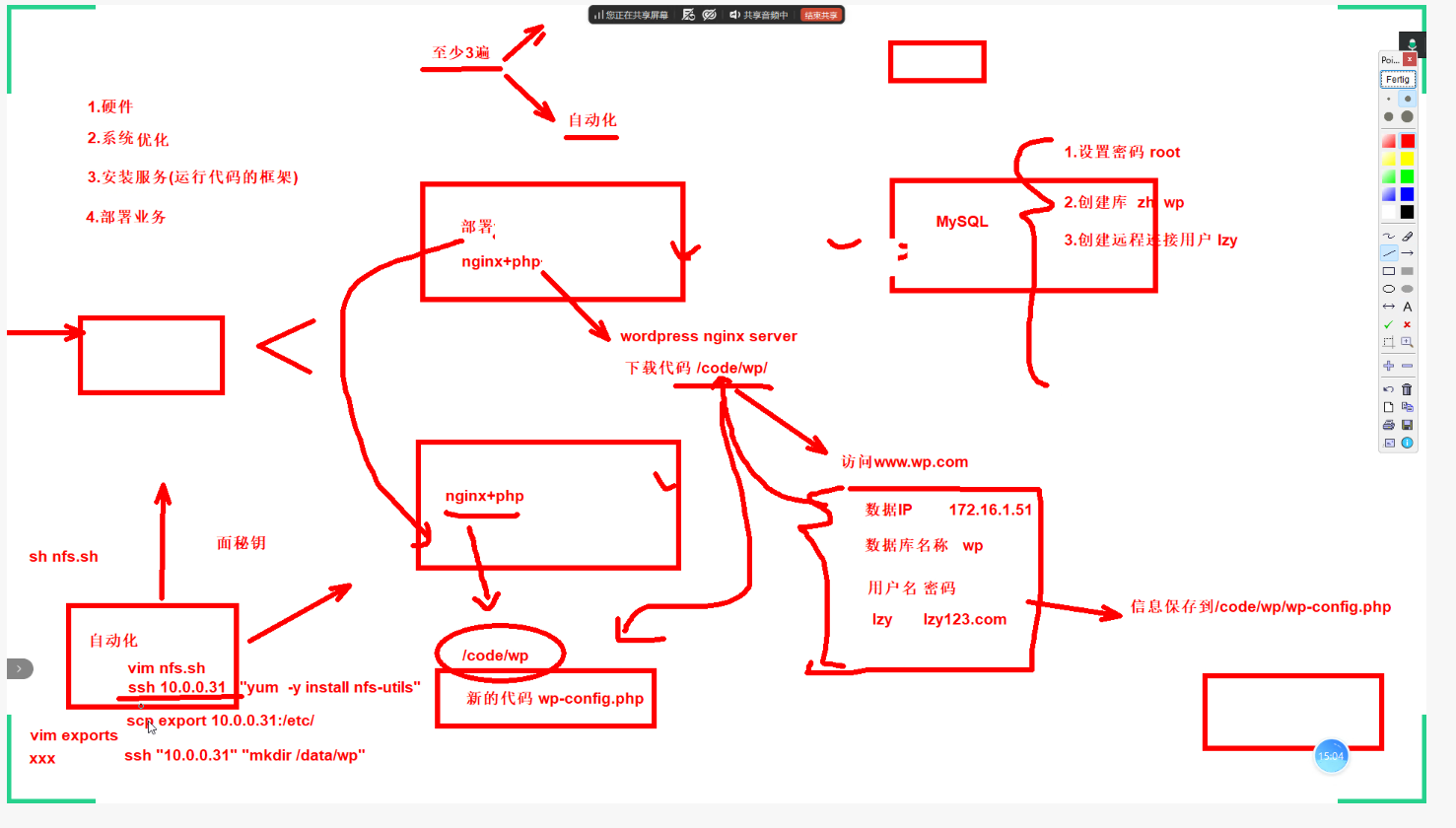
周末作业:
负载均衡
两台WEB
数据库
NFS
BACKUP(lsync)
会话保持业务(redis)
正文完