01. keepalive
什么是高可用?
一般是指2台机器启动着完全相同的业务系统,当有一台机器down机了,另外一台服务器就能快速的接管,对于访问的用户是无感知的。

高可用通常使用什么软件?
硬件通常使用F5 软件通常使用keepalived

keepalived 是如何实现高可用的? 原理? 面试题
keepalived 软件是基于VRRP协议实现的,VRRP虚拟路由冗余协议,主要用于解决单点故障问题
VRRP是如何诞生的,原理又是什么?
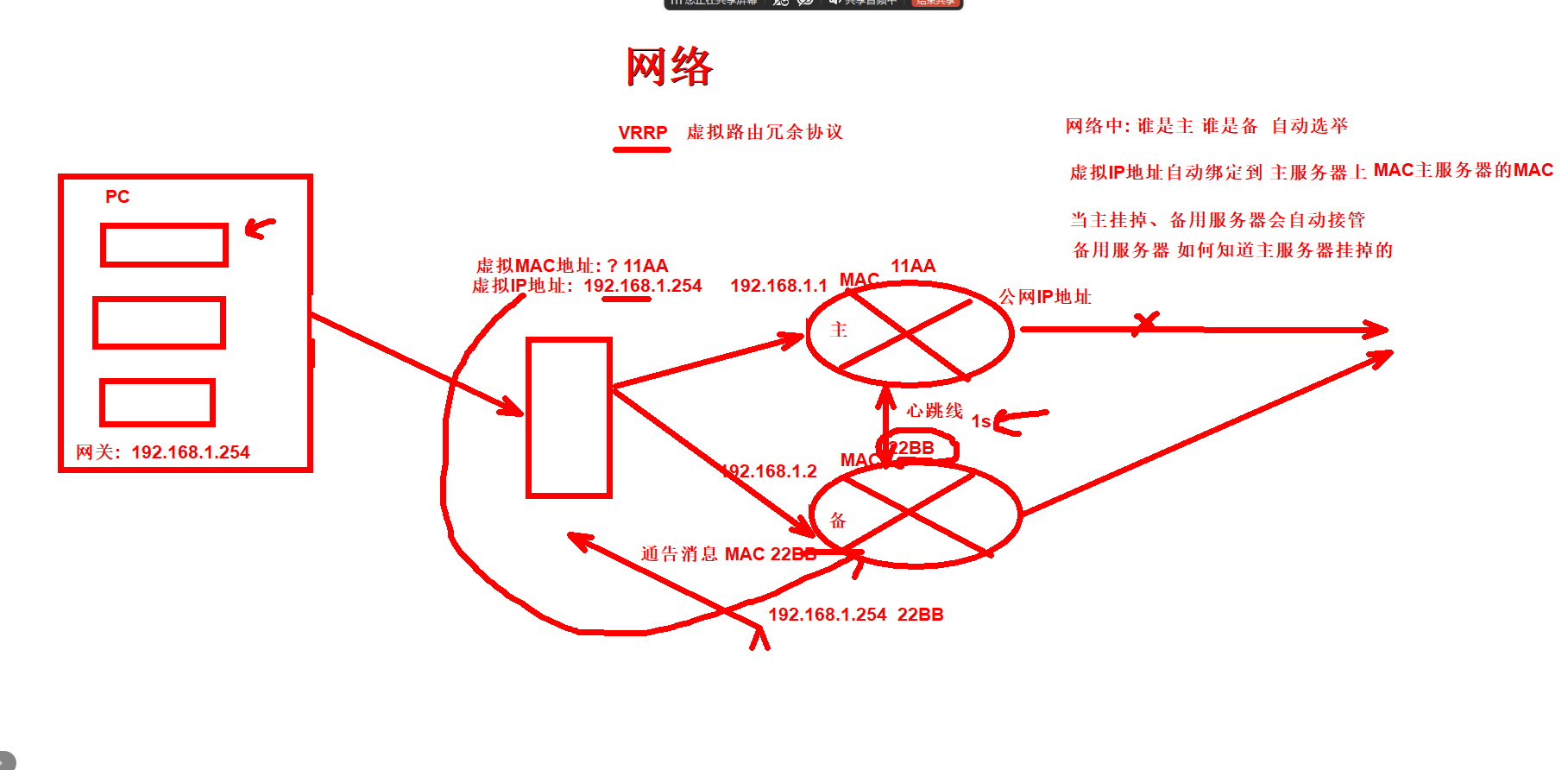
keepalived高可用
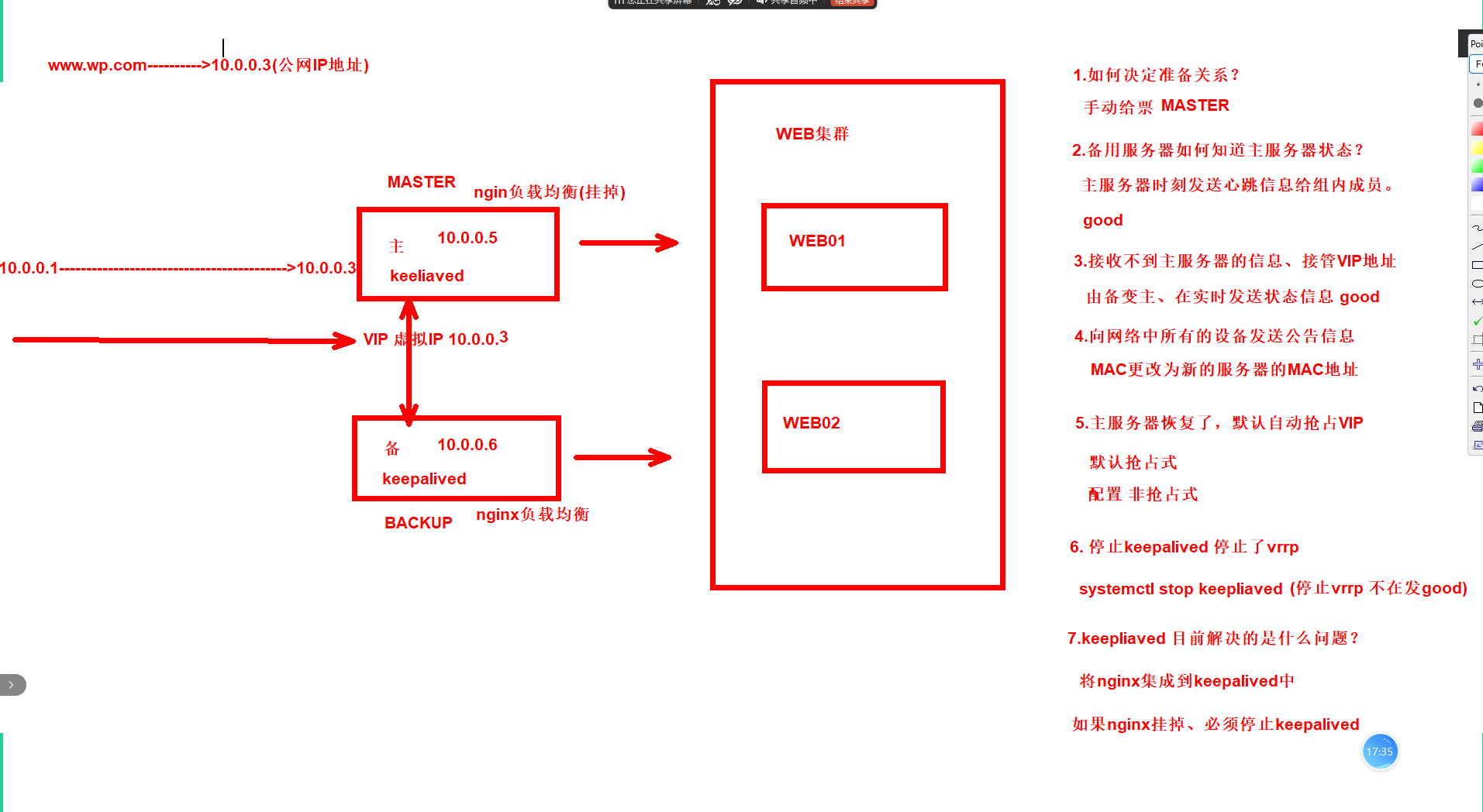
02.部署keepalived
#LB01部署
1.安装keepalived服务
2.配置
3.启动加入开机自启

#克隆LB02服务器IP地址10.0.0.6
1.配置Nginx仓库
2.安装Nginx
3.将lb01上的配置拷贝到lb02

#LB02部署
1.安装keepalived服务
2.配置
3.启动加入开机自启
1.lb01部署keepalived
1.1.安装keepalived
[root@lb01 ~]# yum -y install keepalived
1.2.配置
[root@lb01 ~]# cat /etc/keepalived/keepalived.conf
global_defs {
    router_id lb01
}

vrrp_instance VI_1 {
    state MASTER
    interface ens33
    virtual_router_id 50
    priority 150
    advert_int 1
    authentication {
        auth_type PASS
        auth_pass 1111
    }
    virtual_ipaddress {
        10.0.0.3
    }
}
1.3.启动加入开机自启
[root@lb01 ~]# systemctl start keepalived
[root@lb01 ~]# systemctl enable keepalived
------------------
[root@lb01 ~]# ip a|grep 10.0.0.3
    inet 10.0.0.3/32 scope global ens33
2.克隆lb02服务器IP地址10.0.0.6
2.1.配置Nginx仓库
[root@lb02 ~]# scp 10.0.0.5:/etc/yum.repos.d/nginx.repo /etc/yum.repos.d/
2.2.安装Nginx
[root@lb02 ~]# yum -y install nginx
2.3.将lb01上的配置拷贝到lb02
[root@lb02 ~]# scp -r 10.0.0.5:/etc/nginx/proxy_params /etc/nginx/
[root@lb02 ~]# scp -r 10.0.0.5:/etc/nginx/conf.d/*.conf /etc/nginx/conf.d/
----------启动Nginx
[root@lb02 ~]# systemctl start nginx
[root@lb02 ~]# systemctl enable nginx
3.lb02部署keepalived
3.1.安装服务
[root@lb02 ~]# yum -y install keepalived
3.2.配置服务
[root@lb02 ~]# cat /etc/keepalived/keepalived.conf
global_defs {
    router_id lb02
}

vrrp_instance VI_1 {
    state BACKUP
    interface ens33
    virtual_router_id 50
    priority 100
    advert_int 1
    authentication {
        auth_type PASS
        auth_pass 1111
    }
    virtual_ipaddress {
        10.0.0.3
    }
}
3.3.启动加入开机自启
[root@lb02 ~]# systemctl start keepalived
[root@lb02 ~]# systemctl enable keepalived
-------------------测试
[root@lb01 ~]# systemctl stop keepalived
[root@lb01 ~]# ip a |grep 10.0.0.3

[root@lb02 ~]# ip a |grep 10.0.0.3
    inet 10.0.0.3/32 scope global ens33
03.配置非抢占式
抢占式:配置不同
非抢占式:配置相同
默认为抢占式、当主恢复后,会将VIP抢过来。

配置非抢占式流程:
1.LB01配置
2.LB02配置
1.LB01配置
[root@lb01 ~]# cat /etc/keepalived/keepalived.conf
global_defs {
    router_id lb01
}

vrrp_instance VI_1 {
    state BACKUP               #修改角色信息为BACKUP
    interface ens33
    virtual_router_id 50
    priority 150
    nopreempt               #配置为不抢占
    advert_int 1
    authentication {
        auth_type PASS
        auth_pass 1111
    }
    virtual_ipaddress {
        10.0.0.3
    }
}

---------------------重启
[root@lb01 ~]# systemctl restart keepalived
2.LB02配置
[root@lb02 ~]# cat /etc/keepalived/keepalived.conf
global_defs {
    router_id lb02
}

vrrp_instance VI_1 {
    state BACKUP
    interface ens33
    virtual_router_id 50
    priority 100
    nopreempt
    advert_int 1
    authentication {
        auth_type PASS
        auth_pass 1111
    }
    virtual_ipaddress {
        10.0.0.3
    }
}

---------------------重启服务
[root@lb02 ~]# systemctl restart keepalived
3.测试
#停掉服务
[root@lb01 ~]# ip a|grep 10.0.0.3
    inet 10.0.0.3/32 scope global ens33
[root@lb02 ~]# ip a|grep 10.0.0.3
    inet 10.0.0.3/32 scope global ens33

#启动服务
[root@lb01 ~]# systemctl start keepalived
[root@lb01 ~]# ip a|grep 10.0.0.3
04.脑裂
#配置为抢占式
双方都无法接收到对方的心跳信息!都认为对方挂掉了VIP地址 配置上两台上。

脑裂的原因:
1.网卡损坏
2.网络延迟
3.开启了防火墙
4.心跳线损坏

#测试脑裂
lb01配置改为主,lb02配置改为备,lb02开启防火墙

[root@lb01 ~]# ip a|grep 10.0.0.3
    inet 10.0.0.3/32 scope global ens33


[root@lb02 ~]# systemctl start firewalld
[root@lb02 ~]# ip a|grep 10.0.0.3
    inet 10.0.0.3/32 scope global ens33

#解决方法
1.杀死其中一台keepalived
[root@lb02 ~]# ps -auxf|grep keepalived
root        5925  0.0  0.0 213288   816 pts/0    S+   15:26   0:00              \_ grep keepalived
root        5908  0.0  0.0  16976   708 ?        Ss   15:21   0:00 /usr/sbin/keepalived -D
root        5909  0.0  0.0  16976   708 ?        S    15:21   0:00  \_ /usr/sbin/keepalived -D
[root@lb02 ~]# kill -9 5908
[root@lb01 ~]# ip a|grep 10.0.0.3
    inet 10.0.0.3/32 scope global ens33

[root@lb02 ~]# ip a|grep 10.0.0.3

2.排查导致脑裂的原因
05.基础Nginx到keepalived
LB02写一个探测脚本 探测LB01 LB02都存在10.0.0.3 杀死LB02上的keepalived服务或者使用尝试拉起Nginx的脚本
-------------
#完整keepalived高可用
1.写一个探测脚本
2.将脚本集成到keepalived
1.写一个探测脚本
[root@lb01 ~]# cat check_web.sh
#!/bin/sh
NG=`ps -C nginx --no-header|wc -l`
if [ $NG -eq 0 ]
then
    #如果Nginx不存在则尝试重启Nginx
    systemctl restart nginx
    #等待1秒
    sleep 1
    #在重新检查Nginx是否存在
        NG=`ps -C nginx --no-header|wc -l`
        if [ $NG -eq 0 ]
        then
        #如果$NG变量为0说明Nginx还是没有启动、只能杀死keepalived
        systemctl stop keepalived
        fi
fi

------------给脚本加执行权限
[root@lb01 ~]# chmod +x check_web.sh

------------手动测试

1.停掉LB01 Nginx
[root@lb01 ~]# systemctl stop nginx
访问页面www.wp.com
2.执行脚本
[root@lb01 ~]# sh check_web.sh
访问页面www.wp.com
2.将脚本集成到keepalived
[root@lb01 ~]# cat /etc/keepalived/keepalived.conf
global_defs {                  #全局配置
    router_id lb01             #标识身份->名称
}

vrrp_script check_web{
    script "/root/check_web.sh"         #配置脚本的位置
    interval 5                          #间隔5秒执行1次
}

vrrp_instance VI_1 {
    state MASTER               #标识角色状态 两台为BACKUP不抢占
    interface ens33            #网卡绑定接口
    virtual_router_id 50       #虚拟路由id
    priority 150                #优先级 150票
   # nopreempt                  #配置为不抢占
    advert_int 1               #监测间隔时间 秒
    authentication {
        auth_type PASS         #认证方式
        auth_pass 1111         #认证密码
    }
    virtual_ipaddress {
        10.0.0.3               #虚拟的VIP地址
    }
    track_script {
     check_web              #调用check_web
    }
}

[root@lb01 ~]# systemctl restart keepalived
------------测试

1.停掉LB01 Nginx
[root@lb01 ~]# systemctl stop nginx
访问页面www.wp.com
2.执行脚本
[root@lb01 ~]# sh check_web.sh
访问页面www.wp.com
面试题
高可用和负载均衡的区别
负载均衡、平均分摊流量的 流量转发。
高可用主要的作用用来解决单点故障的。
正文完