2026年4月28日
知识点回顾
01.高可用keepalived
    高可用两台挂了一台顶上配置主备关系,解决单点问题
    通过VRRP虚拟路由冗余协议实现

02.部署keepalived服务
    LB01 lb02
    1.下载
        yum -y install keepalived
    2.配置
        vim /etc/keepalived/keepalived.conf\
        lb01 设置为master lb02设置为backup 票数低于LB01
    3.启动
        systemctl start keepalived
        systemctl enable keepalived
03.配置非抢占式
    1.vim /etc/keepalived/keepalived.conf
    lb01,lb02都改为backup
    并设置不抢占
        nopreetmp
04.脑裂
    两台主机都让认为对方挂了都为了主,导致冲突
    解决方法
    停掉备排查原因
05.集成Nginx
    方法,写一个探测脚本
    keepalived配置中引用脚本
01.rewrite含义
rewrite主要实现url地址重写,以及重定向,就是把传入web的请求重定向到其他url的过程
02.rewrite flag
| flag | 作用 |
|---|---|
| last | 本条规则匹配完成后,停止匹配,不再匹配后面的规则,从停止当前开始 |
| break | 本条规则匹配完成后,停止匹配,不再匹配后面的规则, |
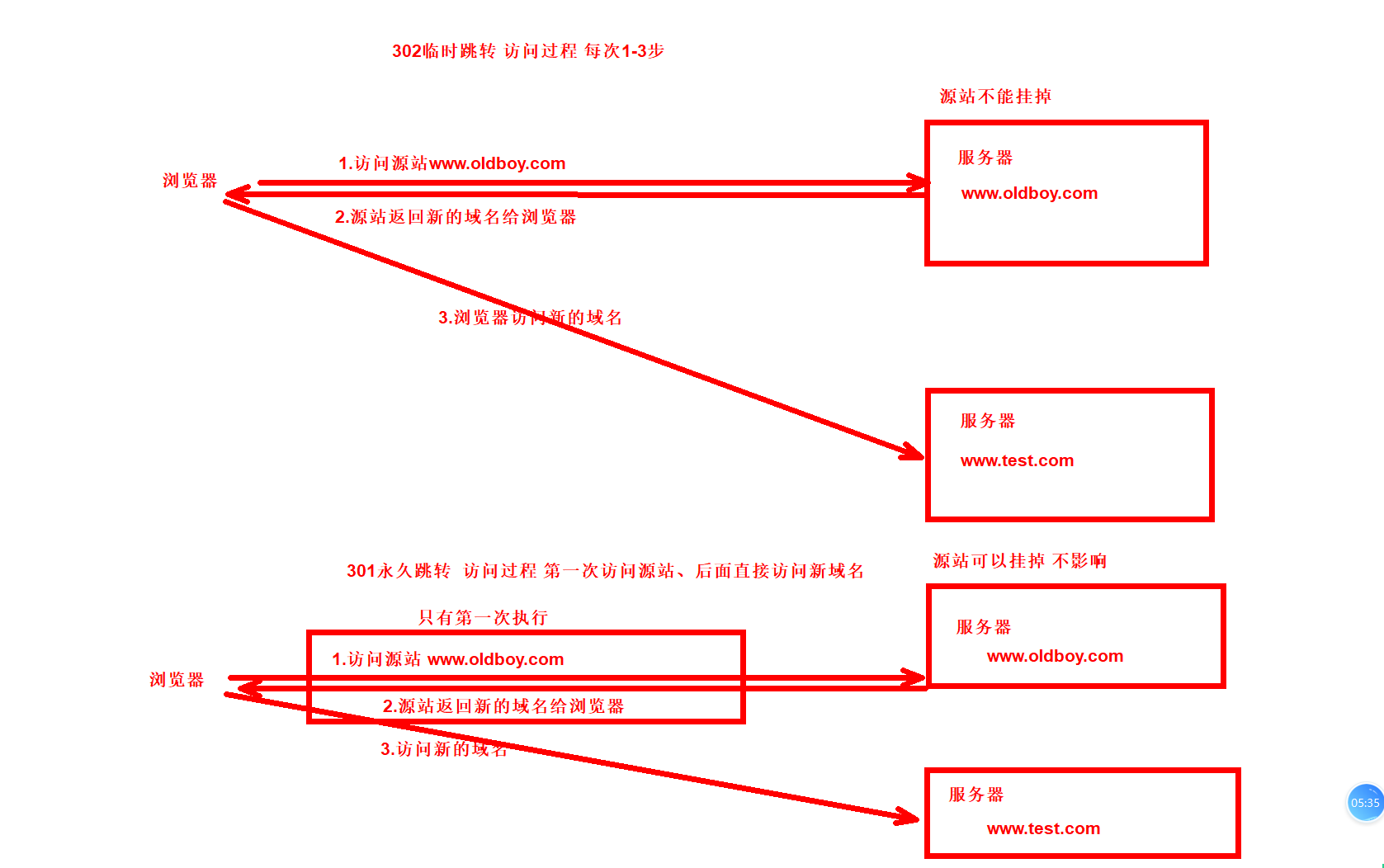
| redirect | 返回302临时重定向,地址栏会显示跳转后的地址,每次都从第一步开始 |
| permanent | 返回301永久重定向,地址栏会显示跳转后的地址,首次第一步,后续直接访问 |
1.标签测试
[root@web01 conf.d]# cat test.conf
server {
        listen 80;
        server_name test.oldboy.com;
        root /code/test/;

        location / {
        rewrite /1.html /2.html;
        rewrite /2.html /3.html;
        }

        location /2.html {
        rewrite /2.html /a.html;
        }

        location /3.html {
        rewrite /3.html /b.html;
        }
}
[root@web01 conf.d]# mkdir /code/test
[root@web01 conf.d]# echo 2.html... > /code/test/2.html
[root@web01 conf.d]# echo 3.html... > /code/test/3.html
[root@web01 conf.d]# echo a.html... > /code/test/a.html
[root@web01 conf.d]# echo b.html... > /code/test/b.html
[root@web01 conf.d]# nginx -t
nginx: the configuration file /etc/nginx/nginx.conf syntax is ok
nginx: configuration file /etc/nginx/nginx.conf test is successful
[root@web01 conf.d]# systemctl restart nginx
--------------------测试访问:
hosts解析
10.0.0.7 test.oldboy.com

1.访问1.html->b.html
2.访问2.html->a.html
3.访问3.html->b.html
1.1.测试break
[root@web01 conf.d]# cat test.conf
server {
        listen 80;
        server_name test.oldboy.com;
        root /code/test/;

        location / {
        rewrite /1.html /2.html break;
        rewrite /2.html /3.html;
        }

        location /2.html {
        rewrite /2.html /a.html;
        }

        location /3.html {
        rewrite /3.html /b.html;
        }
}
[root@web01 conf.d]# nginx -t
nginx: the configuration file /etc/nginx/nginx.conf syntax is ok
nginx: configuration file /etc/nginx/nginx.conf test is successful
[root@web01 conf.d]# systemctl restart nginx
-----------
测试访问1.html->2.html

2.2.测试last
[root@web01 conf.d]# cat test.conf
server {
        listen 80;
        server_name test.oldboy.com;
        root /code/test/;

        location / {
        rewrite /1.html /2.html last;
        rewrite /2.html /3.html;
        }

        location /2.html {
        rewrite /2.html /a.html;
        }

        location /3.html {
        rewrite /3.html /b.html;
        }
}
[root@web01 conf.d]# nginx -t
nginx: the configuration file /etc/nginx/nginx.conf syntax is ok
nginx: configuration file /etc/nginx/nginx.conf test is successful
[root@web01 conf.d]# systemctl restart nginx
测试访问
1.html->a.html

1.3.临时302,永久301
302临时跳转
301永久跳转
#测试302临时跳转
1.配置302临时跳转
[root@web01 conf.d]# cat test.conf
server {
        listen 80;
        server_name rewrite.lzy.com;
        root /code;

        location /test {
                rewrite ^(.*)$  http://www.baidu.com redirect;
                #rewrite ^(.*)$  http://www.oldboy.com permanent;
                #return 301 http://www.oldboy.com;
                #return 302 http://www.oldboy.com;  # 也可以使用return配置302
        }
}
[root@web01 conf.d]# nginx -t
nginx: the configuration file /etc/nginx/nginx.conf syntax is ok
nginx: configuration file /etc/nginx/nginx.conf test is successful
[root@web01 conf.d]# systemctl restart nginx

2.hosts解析
10.0.0.7 rewrite.lzy.com

3.测试访问
第一步:rewrite.lzy.com/test->www.baidu.com
第二步:停掉web01的Nginx服务 再次访问rewirte.lzy.com/test 无法跳转到百度
-------------------------------------------------------------------

#测试301永久重定向
1.配置301永久跳转
[root@web01 conf.d]# cat test.conf
server {
        listen 80;
        server_name rewrite.lzy.com;
        root /code;

        location /test {
                #rewrite ^(.*)$  http://www.baidu.com redirect;
                rewrite ^(.*)$  http://www.baidu.com permanent;
                #return 301 http://www.oldboy.com;
                #return 302 http://www.oldboy.com;  # 也可以使用return配置302
        }
}
[root@web01 conf.d]# nginx -t
nginx: the configuration file /etc/nginx/nginx.conf syntax is ok
nginx: configuration file /etc/nginx/nginx.conf test is successful
[root@web01 conf.d]# systemctl restart nginx
2.测试访问
第一步:rewrite.lzy.com/test 正常跳转百度
第二步:然后停止web01的Nginx服务 再次访问还是可以正常跳转百度
03.rewrite规则实践
案例1:用户访问abc/1.html让用户拿到的是/ccc/bbb/2.html
[root@web01 conf.d]# cat test.conf
server {
        listen 80;
        server_name rewrite.lzy.com;
        root /code;

        location /abc/1.html {
        rewrite ^(.*)$  /ccc/bbb/2.html redirect;
        }
}
[root@web01 conf.d]# nginx -t
nginx: the configuration file /etc/nginx/nginx.conf syntax is ok
nginx: configuration file /etc/nginx/nginx.conf test is successful
[root@web01 conf.d]# systemctl restart nginx
[root@web01 conf.d]# mkdir /code/ccc/bbb/ -p
[root@web01 conf.d]# echo 2.html... > /code/ccc/bbb/2.html
-------------测试访问
rewrite.lzy.com/abc/1.html->rewrite.lzy.com/ccc/bbb/2.html
--------------------------
#注意$如果写到/后面会被视为普通字符
[root@web01 conf.d]# cat test.conf
server {
        listen 80;
        server_name rewrite.lzy.com;
        root /code;

        location /abc$ {
        rewrite ^(.*)$  /ccc/bbb/2.html redirect;
        }
}

浏览器访问rewrite.lzy.com/abc$ 才能匹配2.html
案例2.必须访问rewrite.lzy.com/abc结尾的
[root@web01 conf.d]# cat test.conf
server {
        listen 80;
        server_name rewrite.lzy.com;
        root /code;

        location ~ /(abc)$ {
        rewrite ^(.*)$  /ccc/bbb/2.html redirect;
        }
}
[root@web01 conf.d]# nginx -t
nginx: the configuration file /etc/nginx/nginx.conf syntax is ok
nginx: configuration file /etc/nginx/nginx.conf test is successful
[root@web01 conf.d]# systemctl restart nginx
------------测试访问
rewrite.lzy.com/abc->rewrite.lzy.com/ccc/bbb/2.html
案例3:必须以abc结尾,前面可以任意字符
[root@web01 conf.d]# cat test.conf
server {
        listen 80;
        server_name rewrite.lzy.com;
        root /code;

        location ~ /(.*abc)$ {
        rewrite ^(.*)$  /ccc/bbb/2.html redirect;
        }
}
[root@web01 conf.d]# nginx -t
nginx: the configuration file /etc/nginx/nginx.conf syntax is ok
nginx: configuration file /etc/nginx/nginx.conf test is successful
[root@web01 conf.d]# systemctl restart nginx
----
测试访问
rewrite.lzy.com/bbbbabc->rewrite.lzy.com/ccc/bbb/2.html
案例4:用户访问/2018/ccc/2.html实际上真实访问的是/2026/ccc/bbb/2.html
[root@web01 conf.d]# cat test.conf
server {
        listen 80;
        server_name rewrite.lzy.com;
        root /code;
    #用户访问/2018/ccc/2.html实际上真实访问的是/2026/ccc/bbb/2.html
        location ~ /2018 {
        rewrite ^/2018/ccc/(.*)$  /2026/ccc/bbb/$1 redirect;
        }
}
[root@web01 conf.d]# nginx -t
nginx: the configuration file /etc/nginx/nginx.conf syntax is ok
nginx: configuration file /etc/nginx/nginx.conf test is successful
[root@web01 conf.d]# systemctl restart nginx
[root@web01 conf.d]# mkdir /code/2026/ccc/bbb -p
[root@web01 conf.d]# echo 2.html.... > /code/2026/ccc/bbb/2.html
-----------测试访问
rewrite.lzy.com/2018/ccc/2.html->rewrite.lzy.com/2026/ccc/bbb/2.html
案例5:错误页跳转
[root@web01 conf.d]# cat test.conf
server {
        listen 80;
        server_name rewrite.lzy.com;
        root /code;
    #用户访问/2018/ccc/2.html实际上真实访问的是/2026/ccc/bbb/2.html
        location ~ /2018 {
        rewrite ^/2018/ccc/(.*)$  /2026/ccc/bbb/$1 redirect;
        }

        error_page 403 404 500 501 502 @error_test;
        location @error_test {
        rewrite ^(.*)$ /404.html break;
        }
}
[root@web01 conf.d]# nginx -t
nginx: the configuration file /etc/nginx/nginx.conf syntax is ok
nginx: configuration file /etc/nginx/nginx.conf test is successful
[root@web01 conf.d]# systemctl restart nginx
[root@web01 conf.d]# echo '这是一个错误页面404' > /code/404.html
-----访问测试

案例6.将错误页面跳转到首页
[root@web01 conf.d]# cat test.conf
server {
        listen 80;
        server_name rewrite.lzy.com;
        root /code;
    #用户访问/2018/ccc/2.html实际上真实访问的是/2026/ccc/bbb/2.html
        location ~ /2018 {
        rewrite ^/2018/ccc/(.*)$  /2026/ccc/bbb/$1 redirect;
        }

        error_page 403 404 500 501 502 @error_test;
        location @error_test {
        #rewrite ^(.*)$ rewrite.lzy.com redirect;
    return 302 http://rewrite.lzy.com/;
        }
}
[root@web01 conf.d]# nginx -t
nginx: the configuration file /etc/nginx/nginx.conf syntax is ok
nginx: configuration file /etc/nginx/nginx.conf test is successful
[root@web01 conf.d]# systemctl restart nginx
[root@web01 conf.d]# echo '这是一个首页' > /code/index.html
访问测试

案例7:需要跳转后的请求行加上想要的参数&showoffline=1
[root@web01 conf.d]# cat test.conf
server {
    listen 80;
    server_name test.oldboy.com;
    # $args为Nginx内置变量请求行的参数
    set $args "&showoffline=1";
    location / {
    root /code;
    index index.html;
    }
    if ($remote_addr = 10.0.0.1 ){
    rewrite (.*) http://test.oldboy.com$1;
    }

}
[root@web01 conf.d]# nginx -t
nginx: the configuration file /etc/nginx/nginx.conf syntax is ok
nginx: configuration file /etc/nginx/nginx.conf test is successful
[root@web01 conf.d]# systemctl restart nginx

hosts解析
10.0.0.7 test.oldboy.com
测试访问
http://test.oldboy.com/?&showoffline=1
案例8:用户访问返回维护页面,公司内部访问正常访问
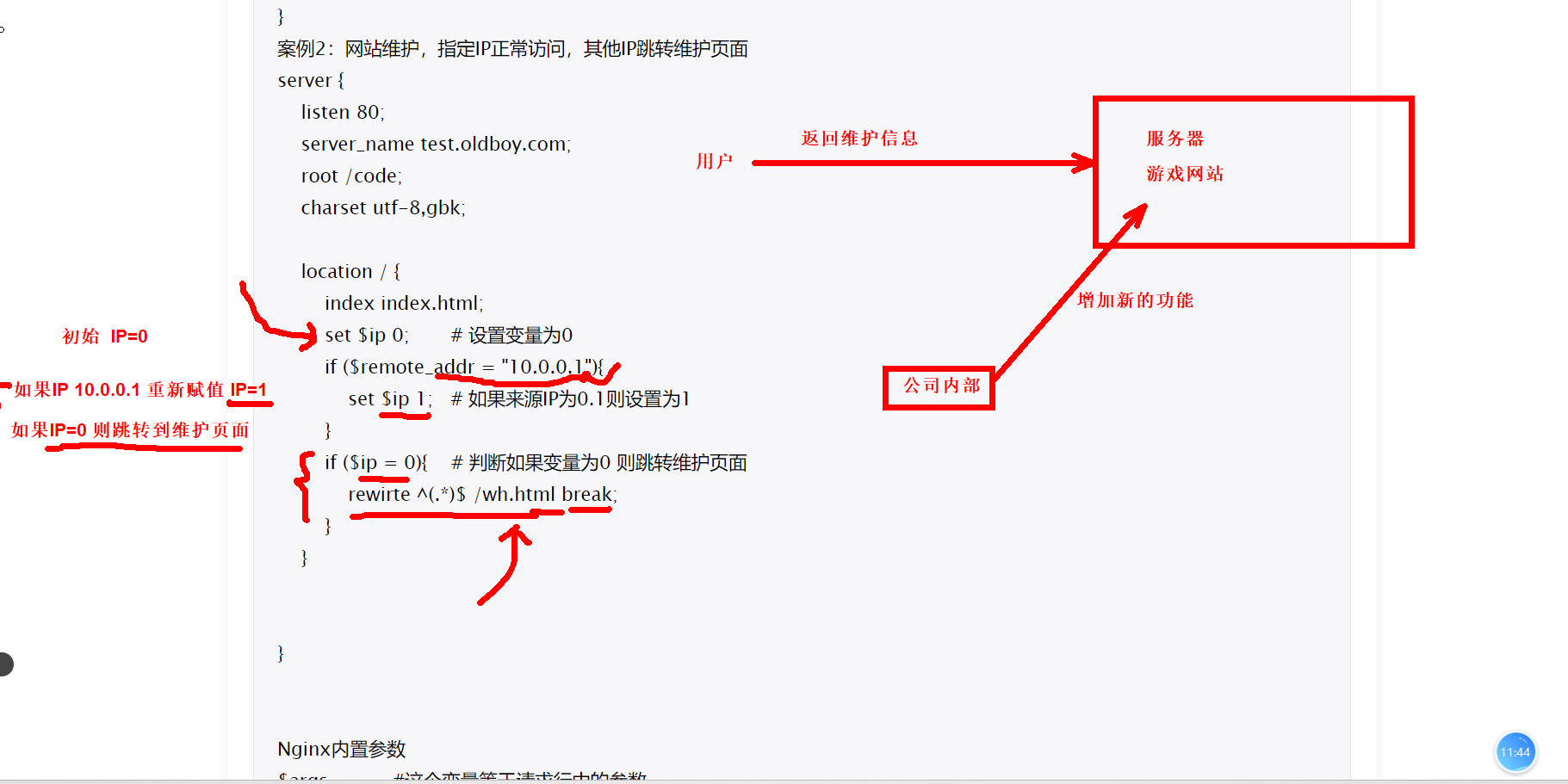
[root@web01 conf.d]# cat test.conf
server {
    listen 80;
    server_name test.oldboy.com;
    root /code;

    location / {
        index index.html;
        set $ip 0;       # 设置变量为0
        if ($remote_addr = "10.0.0.1"){
            set $ip 1;   # 如果来源IP为0.1则设置为1
        }
        if ($ip = 0){    # 判断如果变量为0 则跳转维护页面
            rewrite ^(.*)$ /wh.html break;
        }
    }
}
[root@web01 conf.d]# nginx -t
nginx: the configuration file /etc/nginx/nginx.conf syntax is ok
nginx: configuration file /etc/nginx/nginx.conf test is successful
[root@web01 conf.d]# systemctl restart nginx
[root@web01 conf.d]# echo '这是一个维护页面' > /code/wh.html
访问测试
[root@web01 conf.d]# curl test.oldboy.com
这是一个维护页面
04.补充
1.服务器配置了域名如果只用IP访问的,默认返回第一个server
IP访问方式专业名称称为空的主机头

2.可以手动指定一个空的主机头访问域名的时候的默认server
[root@web01 conf.d]# cat test.conf
server {
    listen 80 default;
    server_name test.oldboy.com;
    root /code;
    index wh.html;
}
[root@web01 conf.d]# nginx -t
nginx: the configuration file /etc/nginx/nginx.conf syntax is ok
nginx: configuration file /etc/nginx/nginx.conf test is successful
[root@web01 conf.d]# systemctl restart nginx
[root@web01 conf.d]# curl 10.0.0.7
这是一个维护页面

3.指定站点目录的方式
root /code/ # 用户访问的www.oldboy.com/abc ---->实际绝对路径是/code/abc/
alias /code/ # 用户访问的www.oldboy.com/abc ---->实际绝对路径是/code/

#root 指定代码目录
[root@web01 conf.d]# cat test.conf
server {
    listen 80;
    server_name test.oldboy.com;

    location /abc {
    root /code/test;
    index index.html;
    }
}
[root@web01 conf.d]# nginx -t
nginx: the configuration file /etc/nginx/nginx.conf syntax is ok
nginx: configuration file /etc/nginx/nginx.conf test is successful
[root@web01 conf.d]# systemctl restart nginx
[root@web01 test]# mkdir -p /code/test/abc
[root@web01 test]# echo aaaa > /code/test/abc/index.html
[root@web01 conf.d]# curl http://test.oldboy.com/abc/
aaaa

#alias指定代码目录
[root@web01 conf.d]# cat test.conf
server {
    listen 80;
    server_name test.oldboy.com;

    location /abc {
    alias /code/test;
    index index.html;
    }
}
[root@web01 conf.d]# nginx -t
nginx: the configuration file /etc/nginx/nginx.conf syntax is ok
nginx: configuration file /etc/nginx/nginx.conf test is successful
[root@web01 conf.d]# systemctl restart nginx
[root@web01 conf.d]# echo '这是alias' > /code/test/index.html
onf.d]# curl http://test.oldboy.com/abc/
这是alias
正文完