2026年4月29日
知识点回顾
1.rewrite含义
url重写,url重定向
2.rewrite标签
last    停止匹配 当前位置再来一次
barek   停止匹配
302   临时重定向
301   永久重定向
3.rewrite 规则实践
正则匹配加重定向
4.补充
    1.空主机头默认
    server {
    listen 80:defnult
    }
    2.站点目录指定方式
    root:/coderoot 指定目录加匹配路径
    alias 指定哪里就在那里
01.Nginx优化
1.加大文件描述符
[root@web01 ~]# tail -1 /etc/security/limits.conf
* - nofile 65535
2.复用time_wait
#不能直接优化、有问题的时候比如客户端大量的syn请求失败、端口不够用
[root@web01 ~]# vim /etc/sysctl.conf
net.ipv4.tcp_tw_reuse = 1       #开启端口复用
net.ipv4.tcp_timestamps = 0     #禁用时间戳 课下扩展参数
[root@web01 ~]# sysctl -p       #可以查看我们添加的内核参数
[root@web01 ~]# sysctl -a       #可以查看所有内核参数
3.负载均衡优化
upstream http_backend {
    server 127.0.0.1:8080;
    keepalive 16;   #长连接
}

server {
    ...
    location /http/ {
        proxy_pass http://http_backend;
        proxy_http_version 1.1;         #对于http协议应该指定为1.1
        proxy_set_header Connection ""; #清除“connection”头字段
        proxy_next_upstream error timeout http_500 http_502 http_503 http_504;  #平滑过渡
        proxy_set_header Host $http_host;
        proxy_set_header X-Real-IP $remote_addr;
        proxy_set_header X-Forwared-For $proxy_add_x_forwarded_for;
        proxy_connect_timeout 30s;      # 代理连接web超时时间
        proxy_read_timeout 60s;         # 代理等待web响应超时时间
        proxy_send_timeout 60s;         # web回传数据至代理超时时间
        proxy_buffering on;             # 开启代理缓冲区,web回传数据至缓冲区,代理边收边传返回给客户端
        proxy_buffer_size 32k;          # 代理接收web响应的头信息的缓冲区大小
        proxy_buffers 4 128k;           # 缓冲代理接收单个长连接内包含的web响应的数量和大小
    ...
    }
}
4.配置静态资源缓存
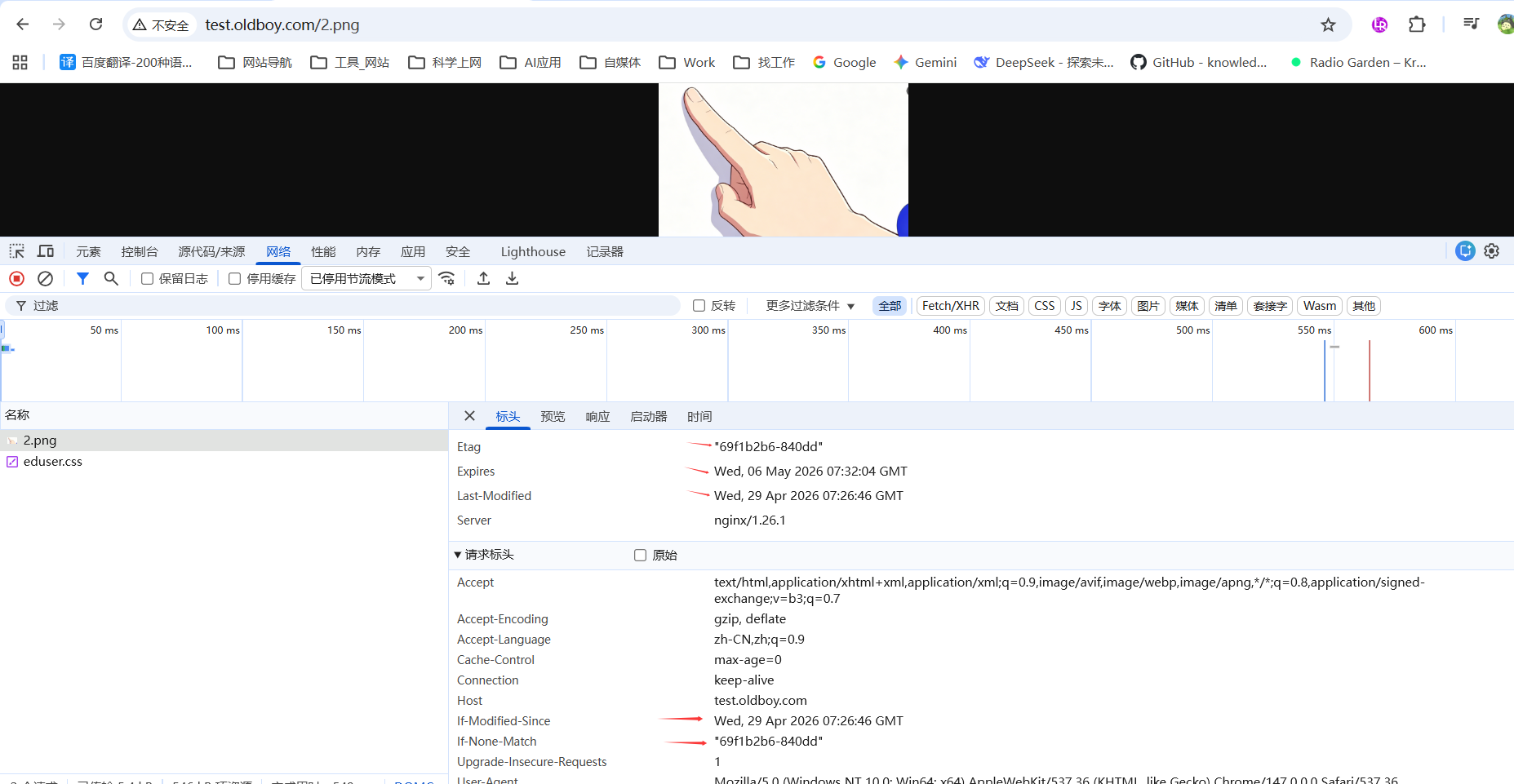
4.1.配置资源缓存
[root@web01 conf.d]# mkdir /code/test
[root@web01 conf.d]# cat test.conf
server {
    listen 80;
    server_name test.oldboy.com;
    root /code/test;
    index index.html;
    location ~ .*\.(jpg|gif|png)$ {
        expires      7d;
    }
}
[root@web01 conf.d]# nginx -t
nginx: the configuration file /etc/nginx/nginx.conf syntax is ok
nginx: configuration file /etc/nginx/nginx.conf test is successful
[root@web01 conf.d]# systemctl restart nginx
#在/code/test上传一张图片,访问
4.2不希望资源缓存
在测试页面不希望静态资源被缓存
[root@web01 conf.d]# cat test.conf
server {
    listen 80;
    server_name test.oldboy.com;
    root /code/test;
    index index.html;
    #location ~ .*\.(jpg|gif|png)$ {
    #    expires      7d;
    #}
location ~ .*\.(js|css|html)$ {
    add_header Cache-Control no-store;
    add_header Pragma no-cache;
}
}
nginx: configuration file /etc/nginx/nginx.conf test is successful
[root@web01 conf.d]# systemctl restart nginx
访问测试
5.配置文件的高效传输
vim /etc/nginx/nginx.conf
...
sendfile        on;
    #tcp_nopush     on;  # 大文件业务建议开启
    tcp_nodelay    on;   # 小文件业务建议开启
...

什么是大文件业务
视频点播(Netflix、YouTube)
软件下载(ISO、安装包)
文件备份同步
大图片(几十MB原始照片)
网盘文件传输


什么是小文件业务
网站首页、HTML页面
REST API接口
小图标、CSS、JS文件
缩略图(几十KB)
高并发缓存服务(Redis/Memcached风格)
6.静态资源压缩
[root@web01 conf.d]# cat /etc/services /etc/services /etc/services /etc/services > /code/test/1.txt
[root@web01 conf.d]# ll -h /code/test/1.txt
-rw-r--r-- 1 root root 2.7M  4月 29 15:47 /code/test/1.txt
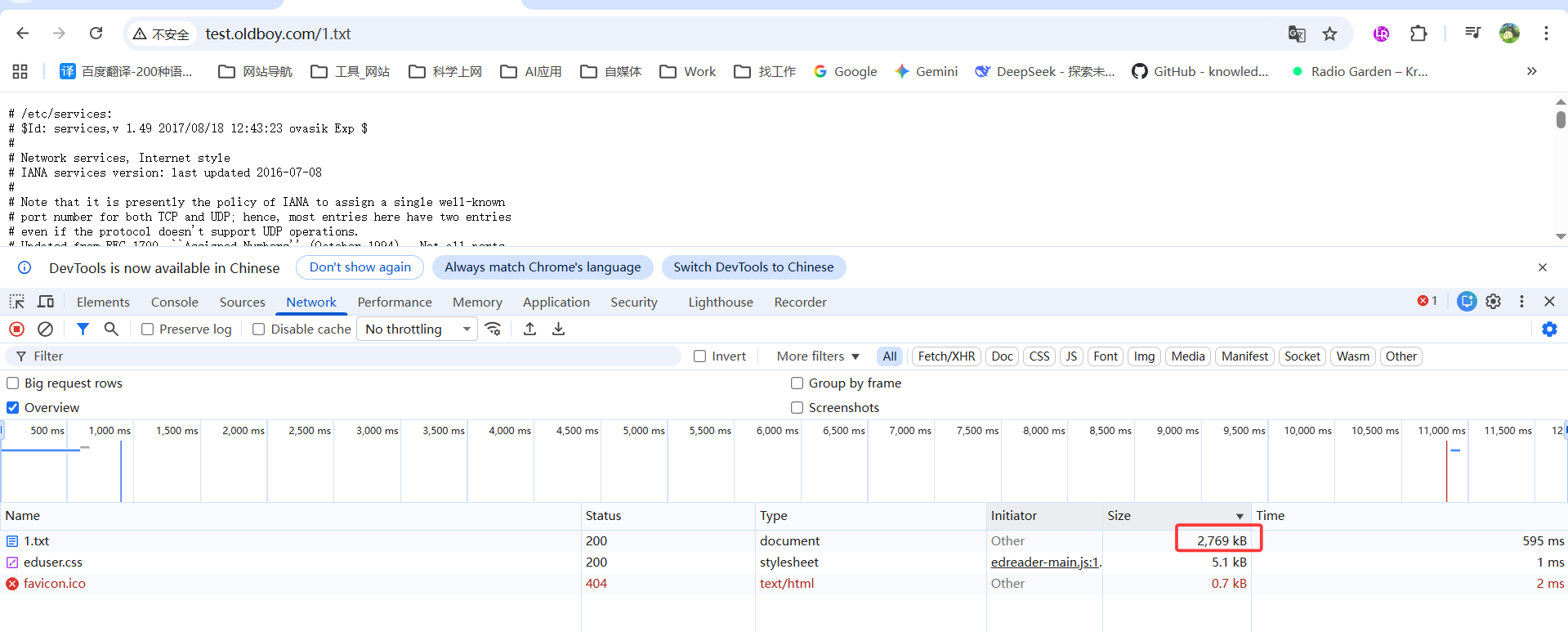
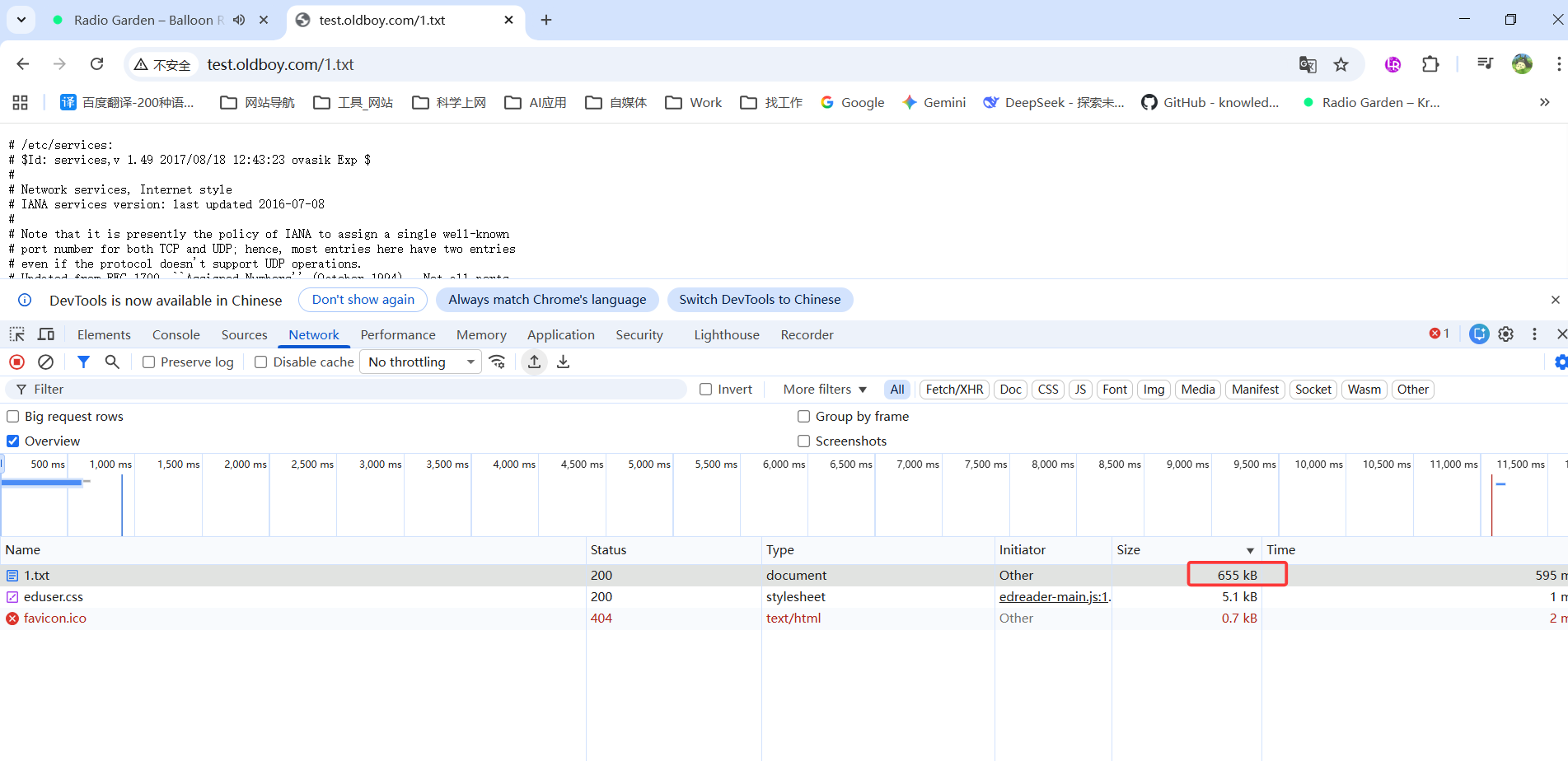
配置压缩静态资源
[root@web01 conf.d]# cat test.conf
server {
    listen 80;
    server_name test.oldboy.com;
    root /code/test;
    index index.html;
    location ~ .*\.(jpg|png|gif) {
        root /code/images;
        #gzip on;
        #gzip_types image/jpeg image/gif image/png;
        #gzip_comp_level 2;
        #gzip_http_version 1.1;
    }
    location ~ .*\.(txt|xml|html|json|js|css)$ {
        gzip on;
        gzip_http_version 1.1;
        gzip_comp_level 1;
        gzip_types text/plain application/json application/x-javascript application/css application/xml text/javascript;
    }
}
[root@web01 conf.d]# nginx -t
nginx: the configuration file /etc/nginx/nginx.conf syntax is ok
nginx: configuration file /etc/nginx/nginx.conf test is successful
[root@web01 conf.d]# systemctl restart nginx
7.配置防盗链
7.1.web01配置正常的网站资源
[root@web01 conf.d]# cat test.conf
server {
    listen 80;
    server_name test.oldboy.com;
    root /code;

    location / {
        index index.html;
    }
}
[root@web01 conf.d]# nginx -t
nginx: the configuration file /etc/nginx/nginx.conf syntax is ok
nginx: configuration file /etc/nginx/nginx.conf test is successful
[root@web01 conf.d]# systemctl restart nginx

/code/test/上传图片

7.2.web02配置盗链
[root@web02 conf.d]# cat test.conf
server {
    listen 80;
    server_name www.jx.com;

    root /code/test;
    index index.html;
}
[root@web02 conf.d]# nginx -t
nginx: the configuration file /etc/nginx/nginx.conf syntax is ok
nginx: configuration file /etc/nginx/nginx.conf test is successful
[root@web02 conf.d]# systemctl restart nginx
-------------------
主要准备html
[root@web02 conf.d]# cat /code/test/index.html
<html>
    <head>
            <meta charset="utf-8">
                <title>oldboyedu.com</title>
    </head>
    <body style="background-color:pink;">
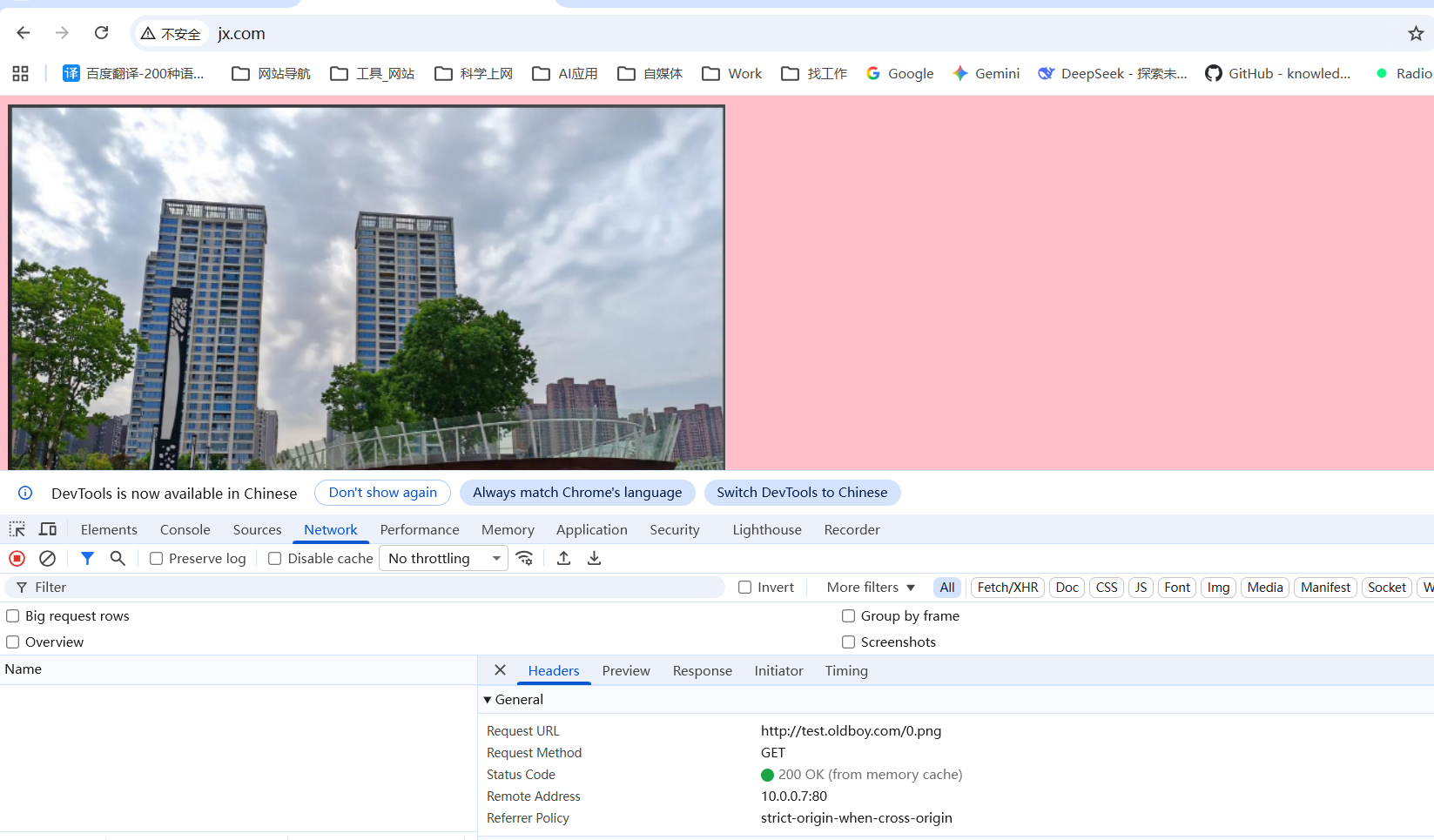
            <img src="http://test.oldboy.com/0.png"/>   #根据情况修改你的服务器地址
    </body>
</html>

--------
hosts解析
10.0.0.7 test.oldboy.com
10.0.0.8 www.jx.com
---------
访问测试
7.3.在web01配置防止盗链
[root@web01 conf.d]# cat test.conf
server {
    listen 80;
    server_name test.oldboy.com;
    root /code;

    location / {
        index index.html;
    }
    location ~* \.(gif|jpg|png|bmp)$ {
    valid_referers none blocked *.baidu.com;  # 只允许baidu来抓取图片
    if ($invalid_referer) {
        return 403;                         #可以选择直接返回403
        #rewrite ^(.*)$ /daolian.png break;      #也可以选择返回一张水印的图片,给公司做广告
     }
    }
}
[root@web01 conf.d]# nginx -t
nginx: the configuration file /etc/nginx/nginx.conf syntax is ok
nginx: configuration file /etc/nginx/nginx.conf test is successful
[root@web01 conf.d]# systemctl restart nginx
-----
再次访问www.jx.com 无法访问到图片
8.允许跨域
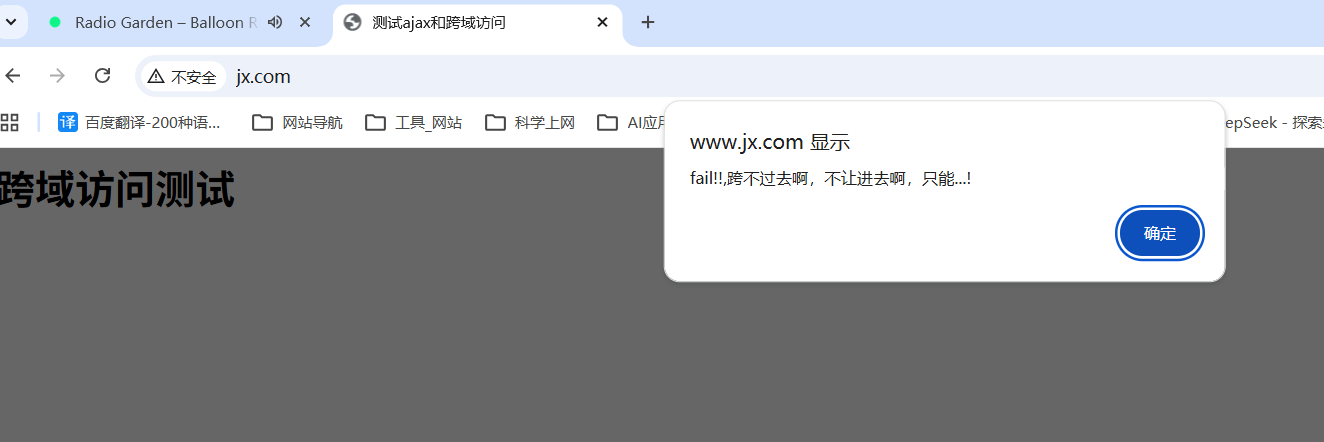
什么是跨域访问,当我们通过浏览器访问a网站时,同时会利用到ajax或其他方式,同时也请求b网站,这样的话就出现了请求一个页面,使用了两个域名,这种方式对浏览器来说默认是禁止的。

测试步骤:
1.web02配置静态文件
2.准备index静态页面
3.测试
8.1.web02配置静态文件
[root@web02 conf.d]# cat test.conf
server {
    listen 80;
    server_name www.jx.com;

    root /code/test;
    index index.html;
}
8.2.准备index静态页面
[root@web02 conf.d]# cat /code/test/index.html
<html lang="en">
<head>
        <meta charset="UTF-8" />
        <title>测试ajax和跨域访问</title>
        <script src="http://libs.baidu.com/jquery/2.1.4/jquery.min.js"></script>
</head>
<script type="text/javascript">
$(document).ready(function(){
        $.ajax({
        type: "GET",
        url: "http://test.oldboy.com",
        success: function(data) {
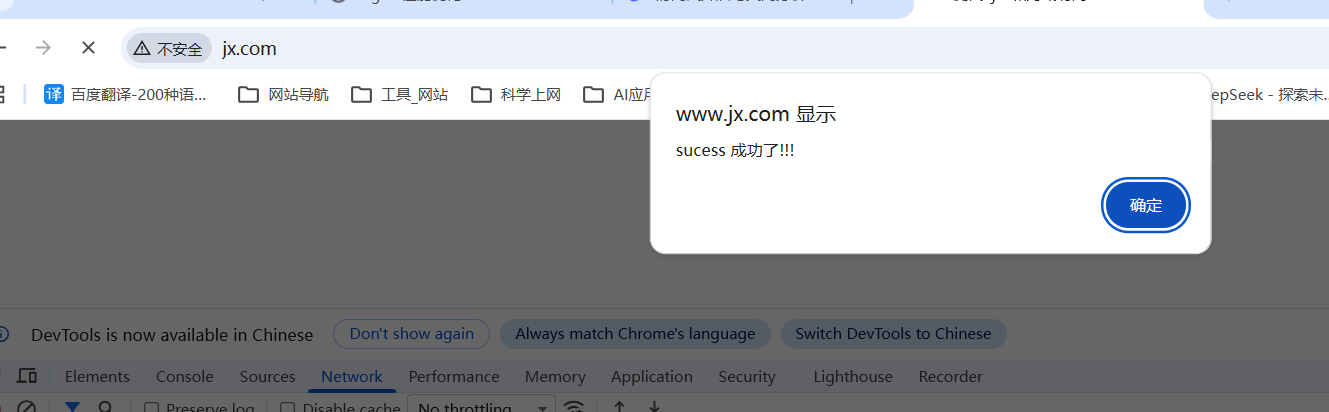
                alert("sucess 成功了!!!");
        },
        error: function() {
                alert("fail!!,跨不过去啊,不让进去啊,只能...!");
        }
        });
});
</script>
        <body>
                <h1>跨域访问测试</h1>
        </body>
</html>
8.3.访问测试
8.4.配置允许跨域
server {
        listen 80;
        server_name test.oldboy.com;
        root /code;
        index index.html;
        charset utf-8;

        location ~ .*\.(html|htm)$ {
            add_header Access-Control-Allow-Origin *;
            add_header Access-Control-Allow-Methods GET,POST,PUT,DELETE,OPTIONS;
        }
}
8.5.再次测试
9.CPU亲和
CPU亲和(affinity)减少进程之间不断频繁切换,减少性能损坏,其实现原理是将CPU核心和Nginx工作进程绑定方式,把每个worker进程固定到对应的CPU上执行,减少切换CPU的cache miss,获得更好的性能

#配置CPU亲和
[root@web01 nginx]# cat nginx.conf
user  nginx;
worker_processes  auto;
worker_cpu_affinity auto; #推荐使用
...
10.Nginx优化
面试题: Nginx优化过什么
Nginx安全与优化总结
1、CPU亲和
2、调整每个worker进程的最大连接数
3、文件的高效读取sendfile
4、系统文件描述符调整65535
5、开启tcp长连接,以及长连接超时时间keepalived
6、开启文件传输压缩gzip
7、开启静态文件expires缓存
8、隐藏nginx版本号
9、配置防盗链、以及跨域访问
10、内核参数配置端口复用(为什么要配置这个)
11、优雅显示nginx错误页面
正文完